You Don't Need a CRM. You Need These 5 Things.
July 1, 2026
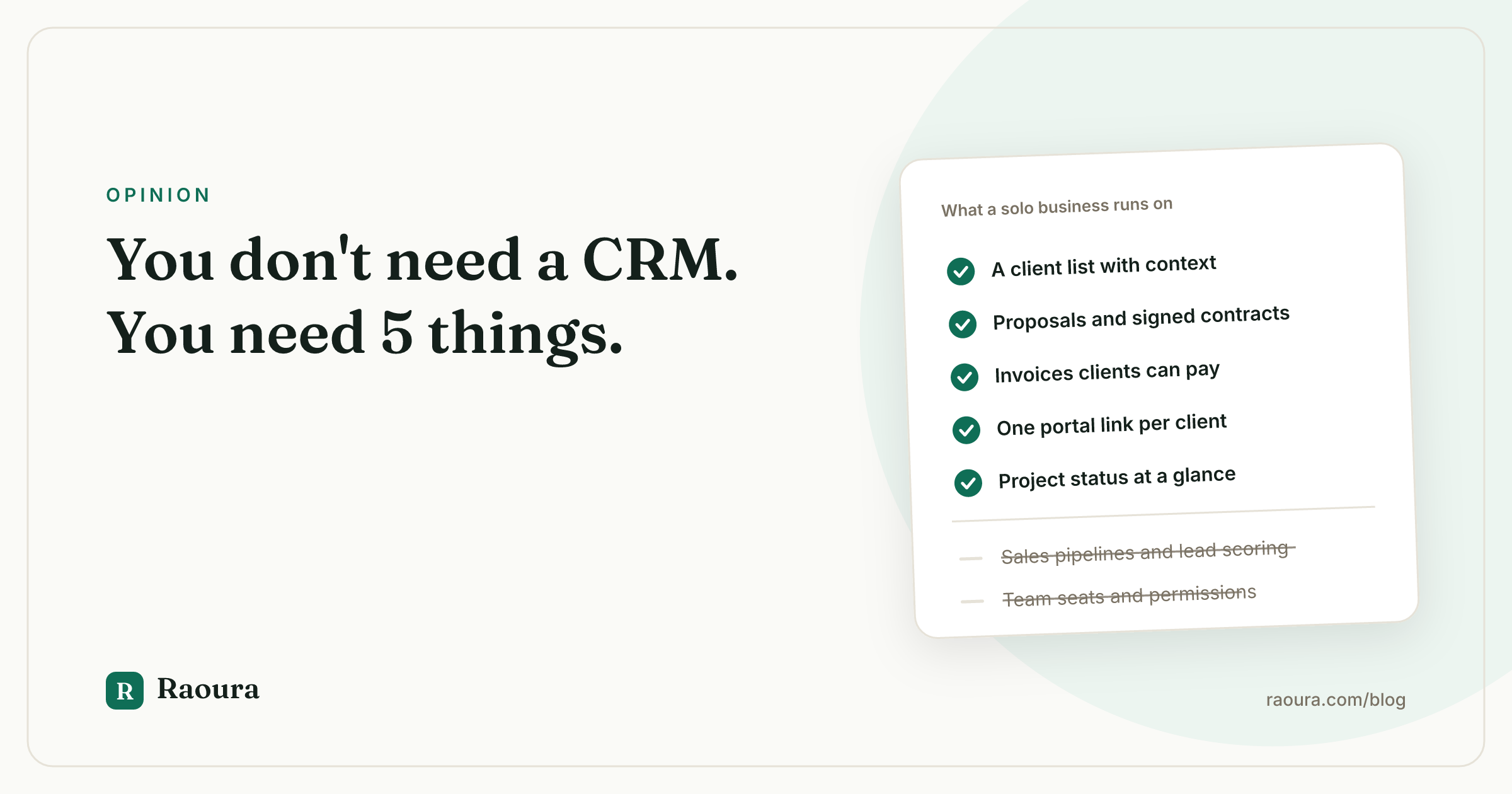
At some point every freelancer googles "CRM for freelancers" and falls into the funnel. Suddenly you're comparing sales pipelines, lead scoring, team permission tiers, and a workflow automation builder with its own certification program. For a business that is one person, a laptop, and eleven clients.
Here's the thing nobody selling you software will say: you don't need a CRM. CRMs were built for sales teams, and you are not a sales team. You're a person who does the work, sends the invoice, and would like to stop losing track of which contract is signed and which invoice is 12 days overdue.
What you need is much smaller, and it's five things.
How solo freelancers ended up with agency software#
The tools marketed to freelancers mostly grew up chasing bigger customers. Agencies pay more, so features follow agencies: multi-user seats, lead routing, approval chains, white-labeling, and lately a mandatory layer of AI features whether you asked or not. Then the same product gets a "freelancer" pricing tier and a landing page with a smiling person and a plant.
The result is a familiar set of complaints in every freelancer community. Users describe tools "adding tons and tons of features I don't need" while the basics stay clunky.
- Dubsado, one of the most popular options, is famous for a setup curve that routinely takes one to two weeks of building forms, workflows, and templates before you can send your first proposal; there is a whole cottage industry of paid "Dubsado setup specialists" whose existence tells you everything about the learning curve.
- HoneyBook keeps stacking AI and team features.
- HubSpot's free tier is a sales funnel into $800/month territory.
None of these are bad products. They're products for a different business than yours. And you pay for that mismatch three ways:
- Money: $25 to $70+ a month for features you'll never open, often with a per-seat model designed for teams of one hundred, not teams of one.
- Time: days of setup, workflow building, and re-learning after every redesign. Feast or famine makes this worse: you shop for software in the famine, then the feast arrives and the half-configured tool sits there judging you.
- Attention: every unused module is UI noise between you and the two questions that matter: what do I owe people, and who owes me money.
The 5 things a solo freelancer actually needs#
Strip away the enterprise cosplay and a one-person service business runs on five capabilities.
1. A client list with context#
Not a "contact record" with 40 CRM fields, deal stages, and lead sources. Just: who this client is, how to reach them, what you've done together, what's active, what they've paid, and your notes. When a client emails after six months of silence, you want their whole history one click away. That's it. That's the "CRM" part, and it's a list.
2. A way to send and sign proposals and contracts#
The gap between "we'd love to work with you!" and signed-plus-deposit-paid is where freelance projects go to die. You need to send a clear scope with a price, let the client accept it, and get a legally binding e-signature without exporting a PDF, uploading it to a separate signing tool, and paying for that tool too. Proposal, acceptance, contract: one motion.
3. Invoicing that gets you paid in the same place#
Invoicing is not bookkeeping. You need to send an invoice the client can pay immediately (card or bank), take a deposit up front, split payments across milestones, handle a client who pays in euros while you bill in dollars, and have reminders go out automatically so you're not hand-writing "just following up" emails. Watch for the quiet tax here: some platforms add their own markup on top of payment processing fees. On a $40,000 year, an extra 1% skim is $400 you paid for nothing.
4. One link where the client sees everything#
Half of freelance admin is answering questions the client could answer themselves: "Can you resend the contract?" "What's left on the invoice?" "Where are we on the project?" A client portal (one link, everything in one place: proposals, contract, invoices, project status, files) kills that entire category of email. Bonus points if the client doesn't need to create yet another account with yet another password; a magic link they click from their email is the right amount of friction, which is almost none.
5. Visibility into project status#
Not Gantt charts, sprint velocity, or resource allocation. Just: which projects are active, what milestone each one is on, what's due next, and what's blocked waiting on the client. Enough that Monday morning takes five minutes to orient, not forty.
That's the whole list. A client list with context, proposals and contracts, invoicing with payments, one client-facing link, and project status. Everything else (pipelines, automation builders, email marketing, scheduling, team roles, AI assistants) is optional at best and bloat at worst for a business of one.
"But what about..." (the features you think you'll need)#
A sales pipeline? A pipeline manages hundreds of leads across a team of reps. You get a handful of inquiries a month and can hold them in your head. A simple "leads I should follow up with" note beats a five-stage kanban you'll abandon by March.
Workflow automations? The automation freelancers actually benefit from is narrow: payment reminders, and maybe a notification when a proposal is viewed. The elaborate if-this-then-that canvas is a hobby disguised as productivity. You will spend a weekend building it and a year ignoring it.
Email marketing and funnels? If you run a newsletter, use a newsletter tool. Bolting broadcast email onto your client management doubles the price and halves the quality of both.
AI everything? If you want AI help writing a proposal, you already have a chatbot tab open. You don't need it welded into your invoicing tool at a price bump you can't decline.
When you DO need a real CRM#
Honesty section. A HubSpot-or-Salesforce-style CRM earns its complexity when:
- You have an actual sales team, even a small one. The moment two or more people work the same leads, you need shared pipelines, ownership rules, and activity logging. That's literally what CRMs are for.
- You handle high lead volume, say dozens of inbound leads a week that need scoring, routing, and multi-touch nurture sequences. No human memory scales to that.
- You're building an agency on purpose, hiring, subcontracting, and selling as a company rather than a person. Then agency software stops being bloat and starts being the point.
If that's your trajectory, buy the big tool and learn it properly. But notice that all three conditions are versions of the same thing: more people. The complexity of your software should scale with headcount, not ambition. As long as headcount is one, five things is the list.
The math on bloat#
Quick sanity check on what the all-in-one suites cost a solo freelancer:
- A typical "starter" tier runs $25 to $40/month, with the features you actually want (multiple payment schedules, removing their branding, more than N projects) gated to a $59 to $79 tier.
- Setup time of one to two weeks, at your billable rate, is the largest cost and never appears on the pricing page.
- Payment processing markups, where they exist, silently scale with your income.
Compare that with the job to be done: send proposals, get signatures, invoice, get paid, keep clients oriented. That job does not cost $70 a month and two weeks of configuration. It never did.
The Raoura angle, stated plainly#
This is the philosophy Raoura is built on, so here's the honest pitch. Raoura is deliberately just the five things:
- Clients with full context.
- Proposals that become e-signed contracts when accepted.
- Invoicing with deposits, partial payments, and multi-currency support.
- A client portal where your client logs in with a magic link and sees everything.
- Projects with milestones so status is always obvious.
Payments happen in the portal and Raoura adds no markup on transaction fees. No pipelines, no seats, no automation canvas, no AI upsell.
One flat plan at $17/month, and a 14-day free trial with no credit card, because software this size shouldn't need a sales call to evaluate. If you outgrow it into a real agency, we'd rather you graduate to agency software than have us slowly morph into it.

Thing number one from the list, as built: the whole relationship on one page, with a follow-up date instead of a five-stage pipeline.
Choose tools like you price projects#
You'd never let a client pay for deliverables they don't need. Apply the same rule to your own stack. Write down the five capabilities, evaluate any tool (including ours) against them, and treat every additional module as a cost, not a bonus. The best software for a solo freelancer is the software you stop noticing, because it's just how clients sign, pay, and stay informed while you do the actual work.
If you still want a shortlist, our ranking of the best CRM for freelancers grades each tool on exactly these five jobs.
Frequently asked questions
Do freelancers need a CRM at all?
Most solo freelancers don't, in the traditional sense. CRMs are built for sales teams managing pipelines at volume. A solo freelancer needs a client list with history and notes, plus proposals, contracts, invoicing, and a way for clients to see project status. Several lightweight tools (Raoura included) cover exactly that without pipeline machinery.
What's the difference between a CRM and a client portal?
A CRM is internal software for tracking prospects and deals; your clients never see it. A client portal is client-facing: one link where a client views and signs contracts, pays invoices, and checks project progress. For solo freelancers, the portal usually delivers more value because it eliminates status-update email, which is where the admin time actually goes.
Is Dubsado or HoneyBook worth it for a solo freelancer?
They're capable tools, but both are increasingly aimed at teams and heavier workflows. Dubsado in particular is known for a setup process that commonly takes one to two weeks. If you'll use the advanced workflows, the investment can pay off. If you mainly need proposals, contracts, invoices, and a portal, a simpler flat-price tool costs less in both money and setup time.
When should a freelancer upgrade to a full CRM like HubSpot?
When people, not features, force it: you hire salespeople or account managers, you handle dozens of leads a week that need routing and nurture sequences, or you're deliberately becoming an agency. Until multiple humans share your client data, a full CRM is overhead.
How much should a solo freelancer spend on client management software?
As a rule of thumb, if a tool for a one-person business costs more than an hour of your billable rate per month, it should justify itself hard. Plenty of solid options exist in the $15 to $30/month range with flat pricing. Watch for hidden costs: per-seat pricing, feature-gated tiers, and markups on payment processing.
Run your client work in one place
Send a proposal, get it signed, invoice, and get paid, with a branded portal your clients will actually use. One flat plan at $17/month, and we never take a cut of your payments.
Try Raoura free for 14 daysNo credit card required. Set up in minutes.
Keep reading
Is Upwork Worth It in 2026? A Break-Even Test for Your Situation
Upwork is worth it when its fee costs less than finding the client yourself, and that is true far more often for a first project than for a repeat client. Here is the break-even math with 2026 numbers: the 0 to 15% fee, Connects, the shrinking client base, and when to wait out the 24-month rule instead of paying to leave.
The Virtual Assistant Contract: 24 Clauses, Scored Against Every Template Ranking for This Search
We scored the four pages that publish actual virtual assistant contract text against 24 clauses a VA agreement needs. Twenty-four of 96 possible slots were filled. The best single template managed 7 out of 24. Twelve clauses appear in none of them, including every clause about the thing that makes VA work different from other freelance work: you are holding your client's passwords and running their inbox. One popular template also tells you a contract fixes your independent contractor status, then mandates client-set 9 to 5 weekday hours in the same document. Here is the clause-by-clause version, with the classification test the DOL is actually applying in 2026, the data protection terms nobody drafts, and the retainer mechanics that decide whether unused hours roll over.
Stripe vs PayPal for Freelancers: Every Fee Verified (2026)
Every page ranking for this comparison either prints in-person retail rates, contradicts itself, or skips the numbers freelancers actually pay. We read the current Stripe and PayPal pricing pages line by line, ran a $3,000 invoice through every rail, and found a $1,764 per year gap between the cheapest setup and the default one.