7 Dubsado Alternatives That Do Not Need a $2,000 Setup Specialist (2026)
July 6, 2026
Dubsado might be the most customizable client management tool a freelancer can buy. Forms, workflows, schedulers, portals: people who invest in it build genuinely remarkable systems. The catch is the word "invest". Dubsado is the only tool in this comparison whose own website links to a directory of paid setup specialists, because getting it fully configured is a project measured in weeks or thousands of dollars.
If you searched "Dubsado alternative", you probably already know this. Maybe you hit the December 2025 price increase, maybe the 3.0 migration wobbled your workflows, or maybe you just never finished the setup you started two years ago. This article compares 7 alternatives with verified July 2026 pricing, honest setup expectations, and the payment-fee math the other lists skip.
One observation before we start, and it is our own: all five of the top-ranking articles for this query in July 2026 are published by competing vendors, and at least three of them cite pricing that predates December 2025 for one or more tools. Every price below was checked against the vendor's own pricing page this month.
A disclosure: this is the Raoura blog, and Raoura is #1 on the list. Read our entry with the same skepticism you would apply to any vendor grading its own homework. We have tried to keep the knives sharp for ourselves too.
Why "Dubsado alternative" usually means "less setup"#
For new subscribers since December 1, 2025, Dubsado costs $35 per month (Starter) or $55 per month (Premier), and a professional setup from a Certified Specialist typically costs $2,000 to $3,500 on top.
The subscription itself is mid-pack: $35 or $55 monthly, or $335 and $525 per year on annual billing, per Dubsado's pricing page. The increase took effect December 1, 2025 alongside the 3.0 launch, per Dubsado's own announcement; existing subscribers keep their old rates, which multiple third-party sources report as $20 and $40 per month.
The real cost is configuration. Dubsado does not hide this. Its footer links to "Hire a Certified Specialist", and the specialists publish their prices:
- Amy Pearson's done-for-you Dubsado setup starts at $2,000.
- Colie James' Dubsado VIP Day is $3,500, and covers one main offer per day.
- Specialist Cait Potter puts full professional setups at $3,000 to $5,000.
There is no equivalent economy of paid setup consultants for any other tool on this list. That is the clearest signal in this entire category.
How long Dubsado setup actually takes#
One Dubsado Certified Specialist itemizes a DIY setup at 86.5 hours in the first year, and professional builds run 6 to 10 weeks from strategy call to handover.
Those numbers come from people who earn a living setting Dubsado up, not from competitors:
- Cait Potter's DIY cost breakdown itemizes 86.5 hours: 12.5 hours of courses, 5 hours of settings, 10 hours on forms, 4 hours on emails, 15 hours building workflows, and 40 hours redoing workflows that did not work the first time.
- Lindsey Garvey, another specialist, says most full setups take "between six and ten weeks" and notes that "Dubsado has a reputation for being complicated."
- A client on Colie James' site: "Colie was able to do in eight hours what I couldn't do in five years."
Vendors say the same thing with less credibility: HoneyBook's comparison content claims Dubsado "may take a week or longer to fully customize", which is a competitor talking, but it is directionally consistent with what the specialists charge to fix.
If you have the weeks and the patience, Dubsado rewards the work. If the sentence "40 hours redoing workflows" gave you a stress response, keep reading.
What changed at Dubsado in the past year#
Since November 2025, Dubsado has rebuilt its entire platform (3.0), raised prices roughly 38 to 75 percent for new users, and replaced its unlimited-time free plan with a 21-day trial.
Three changes matter if you are deciding whether to commit now:
- Dubsado 3.0 rolled out November 17 to 21, 2025, a ground-up rebuild that renames Workflows to node-based "Flows", adds a new inbox and project views, and will sunset the old 2.0 "sometime in 2026", per Dubsado. Early practitioner reviews were mixed: Certified Specialist Colie James documented missing features, rough project views, and Flows bugs at launch, and Dubsado's own changelog shows a steady stream of post-launch fixes. If you are learning the tool today, you are learning it mid-transition.
- New pricing took effect December 1, 2025: $35 and $55 per month, up from the widely reported $20 and $40. Existing subscribers are grandfathered.
- The famous free plan is gone for new users. The old trial was free forever with up to 3 clients. The current trial is 21 days of full Premier access, per Dubsado's pricing FAQ. You now have 3 weeks to evaluate a tool that specialists say takes 6 to 10 weeks to set up properly. That mismatch is the whole argument for this article.
If you have already decided to leave and want the export walkthrough, we wrote a separate weekend migration guide for Dubsado.
The 7 alternatives#
1. Raoura: one flat $17 plan, set up in an afternoon#
Pricing: $17 per month, one flat plan, everything included. 14-day free trial, no credit card. Payments go through your own Stripe account at Stripe's standard rate (2.9% plus 30 cents for US cards, per Stripe's pricing page), with no markup from us.
What it is: Raoura covers the core loop of solo client work: proposals with templates and AI drafting, e-sign contracts, invoicing with deposits, partial payments and automatic overdue reminders, projects with client-approvable milestones, and a branded client portal with magic-link login. Point it at your website and it matches your brand automatically.
Setup: this is the reason Raoura is on its own list. There is no workflow builder to configure, which means there is nothing to spend 86.5 hours on. Send your first proposal or invoice the same afternoon you sign up. We say more about the setup-time contrast in Raoura vs Dubsado.

The entire proposal setup: four fields and a save button. This is what "no 86.5 hours" looks like in practice.
Honestly: Raoura is deliberately smaller than Dubsado. No automation builder, no scheduler, no lead capture forms, no multi-step canned email sequences, no team seats. If workflows are why you chose Dubsado and you still want them, Moxie below is the better fit. And Raoura is new: we will not invent review scores, so judge it on the trial. Disclosure: Raoura is our product.
Best for: solo freelancers doing project work who want proposals, contracts, invoices, and a client portal working today, not in six weeks.
Tradeoffs: no automations, scheduling, or time tracking. New product without a long public track record.
2. Moxie: the closest to Dubsado's power without the setup economy#
Pricing: Starter $12 per month ($10 annual), Pro $25 ($20 annual), Teams $40 ($32 annual), 14-day free trial, per Moxie's pricing page. No markup on payments.
What it is: Moxie is built only for freelancers: CRM, proposals, contracts, invoicing, time tracking, a meeting scheduler, forms, and automations on Pro. It is the strongest answer to "I want most of what Dubsado does, minus the consulting bill." Its Trustpilot rating sits at 4.8 as of July 2026, the best score in this category.
Setup: hours to days, not weeks. The automations are opinionated and pre-shaped rather than fully free-form, which is exactly why they do not need a specialist. We compare it with our own tool in Raoura vs Moxie.
Best for: Dubsado refugees who want workflow depth and scheduling at $20 to $25 per month.
Tradeoffs: automations and the white-label portal require Pro. Recent leadership change (the founder moved to the board and a new CEO took over), which is worth watching, though the product cadence has continued.
3. HoneyBook: fast setup, bigger bill, their payment rails only#
Pricing: billed yearly, Starter is $29 per month, Essentials $49, Premium $109, per HoneyBook's pricing page; monthly billing runs higher (third parties report $36, $59, and $129). Card processing starts at 2.9% plus 25 cents (HoneyBook advertises rates as low as 2.7% plus 10 cents on the same page), ACH at 1.5%. 30-day free trial. US and Canada only.
What it is: the biggest brand in creative client management: scheduler, lead pipeline, payments, template marketplace. Setup is genuinely fast; even its critics concede you can be running in a day.
Setup: fast, because customization is shallower than Dubsado's. That cuts both ways.
Best for: US or Canada freelancers who live on scheduled sessions and inquiries and want an ecosystem, not just software.
Tradeoffs: you must use HoneyBook as your payment processor; there is no bring-your-own-Stripe option, so the processing fees are part of the price forever. It also raised subscription prices by up to 89% in February 2025, which we covered in our HoneyBook price increase guide. Not available outside the US and Canada.
4. Bonsai: polished suite, per-seat pricing, and a 1% fee on your own Stripe#
Pricing: per user, billed monthly: Basic $15, Essentials $25, Premium $39, Elite $59; annual billing drops those to $9, $19, $29, and $49 per user per month, per Bonsai's pricing page. 7-day trial.
What it is: a polished proposals-contracts-invoicing-projects suite, now "Bonsai, a Zoom company" and visibly pivoting toward agencies and teams.
Setup: quick. Bonsai's templates get you moving in a day.
Best for: freelancers who want breadth and polish and do not mind tiered, per-seat pricing.
Tradeoffs: the fee structure needs a flashlight. Per Bonsai's own help center, using your own Stripe or PayPal adds a 1% platform fee on top of processor rates, and international payments carry a 2.5% currency conversion fee. Its Trustpilot score is 4.2 versus Moxie's 4.8. And the Zoom acquisition makes the solo-freelancer roadmap uncertain, which is why we wrote Bonsai Alternatives Now That Bonsai Belongs to Zoom.
5. 17hats: Dubsado-grade automation, $60 flat#
Pricing: one all-inclusive plan at $60 per month or $600 per year, with a current first-year promo around 50% off annual, per 17hats' pricing page. Payments run through your own Stripe or Square at processor rates, no markup. There is also a free CRM tier capped at 4 invoices per quarter.
What it is: the veteran all-in-one for small service businesses: deep automations, SMS reminders, phone-first workflows.
Setup: days, not Dubsado weeks, but there is a real learning curve. It is the alternative for people leaving Dubsado's setup, not Dubsado's philosophy.
Best for: solos who want serious automation with structure instead of a blank canvas.
Tradeoffs: $600 per year is the most expensive recurring bill on this list, and year two arrives at full freight after the promo year. We compared cheaper options in 7 17hats Alternatives.
6. Indy: the budget pick with a real free tier#
Pricing: free plan with 3 proposals, contracts, and invoices per month; Pro at $25 per month, around $225 per year, currently promoted at $12.50 per month billed as $300 every two years, per Indy's pricing page.
What it is: proposals, contracts, invoicing, tasks, files, and a simple client portal in a light package.
Setup: minutes. There is very little to configure, which is the point.
Best for: part-timers and starters for whom 3 documents a month is real life and $0 is the right budget.
Tradeoffs: far lighter than Dubsado on workflow depth, and the free tier's 3-document cap pushes a busy month onto Pro, at which point Moxie and Raoura enter the conversation. Public feature announcements have been quiet lately; check their changelog before committing long term.
7. Bloom: cheap entry, but read the Starter fee line#
Pricing: promo pricing as of July 2026: Starter $7 per month, Standard $17, Plus $33 (regular prices roughly double), per Bloom's pricing page.
What it is: client management born in the photography world: booking, galleries-adjacent workflows, invoicing, contracts, a decent portal.
Setup: light. Templates carry most of it.
Best for: creatives who want a photography-flavored tool at the lowest entry price on this list.
Tradeoffs: Bloom's own comparison table shows the Starter plan carries a 1.5% Bloom fee on card and ACH payments on top of processing; only the higher tiers drop it. Starter also caps you at 3 active projects and 1 workflow. The $7 price is a 12-month promotional rate, so price year two before deciding.
Quick comparison#
| Tool | Entry price (July 2026) | Payment fees | Setup lift |
|---|---|---|---|
| Dubsado | $35/mo new ($335/yr) | Your own Stripe/Square/PayPal, no markup | Weeks DIY, or $2,000 to $3,500 specialist |
| Raoura | $17/mo flat | Your own Stripe, no markup | An afternoon |
| Moxie | $12/mo ($10 annual) | No markup | Hours to days |
| HoneyBook | $29/mo billed yearly | From 2.9% + 25c card, 1.5% ACH, their rails only | About a day |
| Bonsai | $15/user/mo ($9 annual) | +1% on your own Stripe, 2.5% FX | About a day |
| 17hats | $60/mo ($600/yr) | Your own Stripe/Square, no markup | Days |
| Indy | Free (3 docs/mo), $25 Pro | Processor rates | Minutes |
| Bloom | $7/mo promo | +1.5% on Starter tier | Hours |
The year-one math#
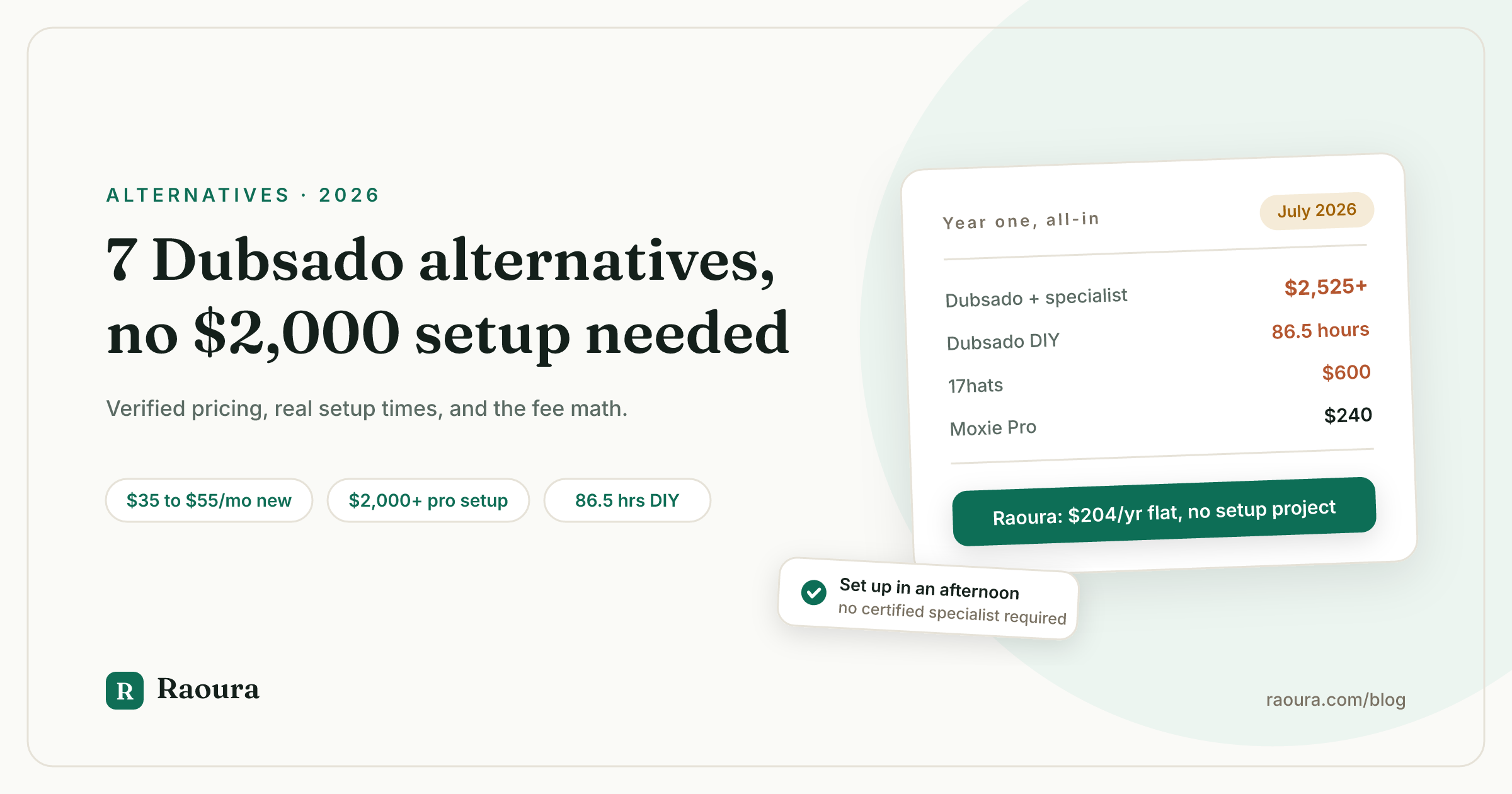
Dubsado Premier plus a professional setup costs $2,525 to $4,025 in year one; every alternative on this list costs under $700 all-in.
Year one, annual billing where available, setup included:
| Tool | Subscription (year 1) | Setup cost | Year-one total |
|---|---|---|---|
| Dubsado Premier + specialist | $525 | $2,000 to $3,500 | $2,525 to $4,025 |
| Dubsado Premier, DIY | $525 | ~86.5 hours of your time | $525 + your hours |
| 17hats | $600 ($300 promo year) | $0 | $300 to $600 |
| HoneyBook Starter | $348 | $0 | $348 |
| Moxie Pro | $240 | $0 | $240 |
| Bonsai Essentials | $228 | $0 | $228 |
| Indy Pro | $225 | $0 | $225 |
| Raoura | $204 | $0 | $204 |
| Bloom Standard | $204 (promo year) | $0 | $204 |
Processing fees deserve one more sentence, because on real revenue they outweigh subscriptions. On $60,000 of card payments in a year, Stripe's standard 2.9% is about $1,740 in fees; Bonsai's 1% own-Stripe platform fee adds roughly $600 on top of that, and Bloom's Starter-tier 1.5% adds roughly $900. Tools that let you run your own Stripe with no markup (Dubsado, 17hats, Moxie, Raoura) all cost the same $1,740 there.
How to choose#
If what you actually use is proposals, contracts, invoices, and a client portal, you can replace Dubsado for $17 to $25 per month with zero setup project.
Ask three questions.
- Did you ever finish setting Dubsado up? If yes, and your workflows run your business, think hard before leaving: you are grandfathered at the old price and your sunk setup cost is now an asset. Your real question is whether 3.0 keeps your workflows intact. If no, stop paying for potential. An unconfigured Dubsado is an expensive invoice generator.
- Do you want workflows at all? If yes, Moxie gives you most of the depth at $20 to $25 without a specialist. If your honest answer is "I want to send a proposal, get it signed, invoice, and give the client one link", that is Raoura or Indy territory, and the simpler tool will beat the powerful one you never configure.
- What does the tool cost on real revenue? Add subscription plus processing markup plus setup. The year-one table above is the whole argument: the gap between $204 and $4,025 buys a lot of actual business.
When you are ready to move, our Dubsado migration guide covers exactly what exports, what stays behind, and a realistic Saturday plan.
Frequently asked questions
How much does Dubsado cost in 2026?
For new subscribers, Dubsado costs $35 per month for Starter or $55 per month for Premier, or $335 and $525 per year on annual billing, per Dubsado's pricing page. Subscribers who joined before December 1, 2025 keep their previous rates.
How much does a Dubsado setup specialist cost?
Published rates from Dubsado Certified Specialists run $2,000 to $3,500 for a full done-for-you setup, with some quoting $3,000 to $5,000. Examples: Amy Pearson from $2,000 and Colie James' $3,500 VIP Day.
Does Dubsado still have a free plan?
No. The old free-forever trial capped at 3 clients is gone for new users. As of July 2026, Dubsado offers a 21-day free trial of the Premier plan with no credit card required, per Dubsado's pricing FAQ.
What is the cheapest Dubsado alternative?
Indy has a free plan with 3 proposals, contracts, and invoices per month, and Bloom's Starter promo is $7 per month (with a 1.5% payment fee on that tier), as of July 2026. Among full-featured flat-price tools, Moxie Starter is $12 per month and Raoura is $17 per month with everything included. Disclosure: Raoura is our product.
What is the easiest Dubsado alternative to set up?
The tools with the least to configure are Indy and Raoura, because neither has a workflow builder: you can send a first invoice or proposal within the hour. Moxie takes hours to days. HoneyBook and Bonsai take about a day. Anything with a free-form automation engine takes longer by design.
Is Dubsado worth it if I am grandfathered at $20 or $40 per month?
If your setup is complete and your workflows survived the 3.0 transition, the grandfathered price is a genuinely good deal and switching costs you a working system. If you never finished setup, the discount does not fix the 86.5-hour problem, and a simpler tool will serve you better.
The short version#
Dubsado is a power tool that assumes you will invest weeks or thousands of dollars before it pays off, and its own specialist directory proves the point. If you have that appetite, it remains the deepest customization on the market, now at $35 to $55 per month for new users. If you do not, Moxie gets you most of the power for $20 to $25 with no specialist, and Raoura gets you the core client workflow, proposals, contracts, invoices, milestones, and a branded portal, for $17 flat, set up in an afternoon. Disclosure: Raoura is our product.
Try Raoura free for 14 days at raoura.com. Bring one real client project and see whether you miss the workflows or the 86.5 hours.
All prices, fees, and claims verified July 2026 against the linked primary sources.
Run your client work in one place
Send a proposal, get it signed, invoice, and get paid, with a branded portal your clients will actually use. One flat plan at $17/month, and we never take a cut of your payments.
Try Raoura free for 14 daysNo credit card required. Set up in minutes.
Keep reading
Is Upwork Worth It in 2026? A Break-Even Test for Your Situation
Upwork is worth it when its fee costs less than finding the client yourself, and that is true far more often for a first project than for a repeat client. Here is the break-even math with 2026 numbers: the 0 to 15% fee, Connects, the shrinking client base, and when to wait out the 24-month rule instead of paying to leave.
The Virtual Assistant Contract: 24 Clauses, Scored Against Every Template Ranking for This Search
We scored the four pages that publish actual virtual assistant contract text against 24 clauses a VA agreement needs. Twenty-four of 96 possible slots were filled. The best single template managed 7 out of 24. Twelve clauses appear in none of them, including every clause about the thing that makes VA work different from other freelance work: you are holding your client's passwords and running their inbox. One popular template also tells you a contract fixes your independent contractor status, then mandates client-set 9 to 5 weekday hours in the same document. Here is the clause-by-clause version, with the classification test the DOL is actually applying in 2026, the data protection terms nobody drafts, and the retainer mechanics that decide whether unused hours roll over.
Stripe vs PayPal for Freelancers: Every Fee Verified (2026)
Every page ranking for this comparison either prints in-person retail rates, contradicts itself, or skips the numbers freelancers actually pay. We read the current Stripe and PayPal pricing pages line by line, ran a $3,000 invoice through every rail, and found a $1,764 per year gap between the cheapest setup and the default one.