7 Bonsai Alternatives Now That Bonsai Belongs to Zoom (2026)
July 6, 2026
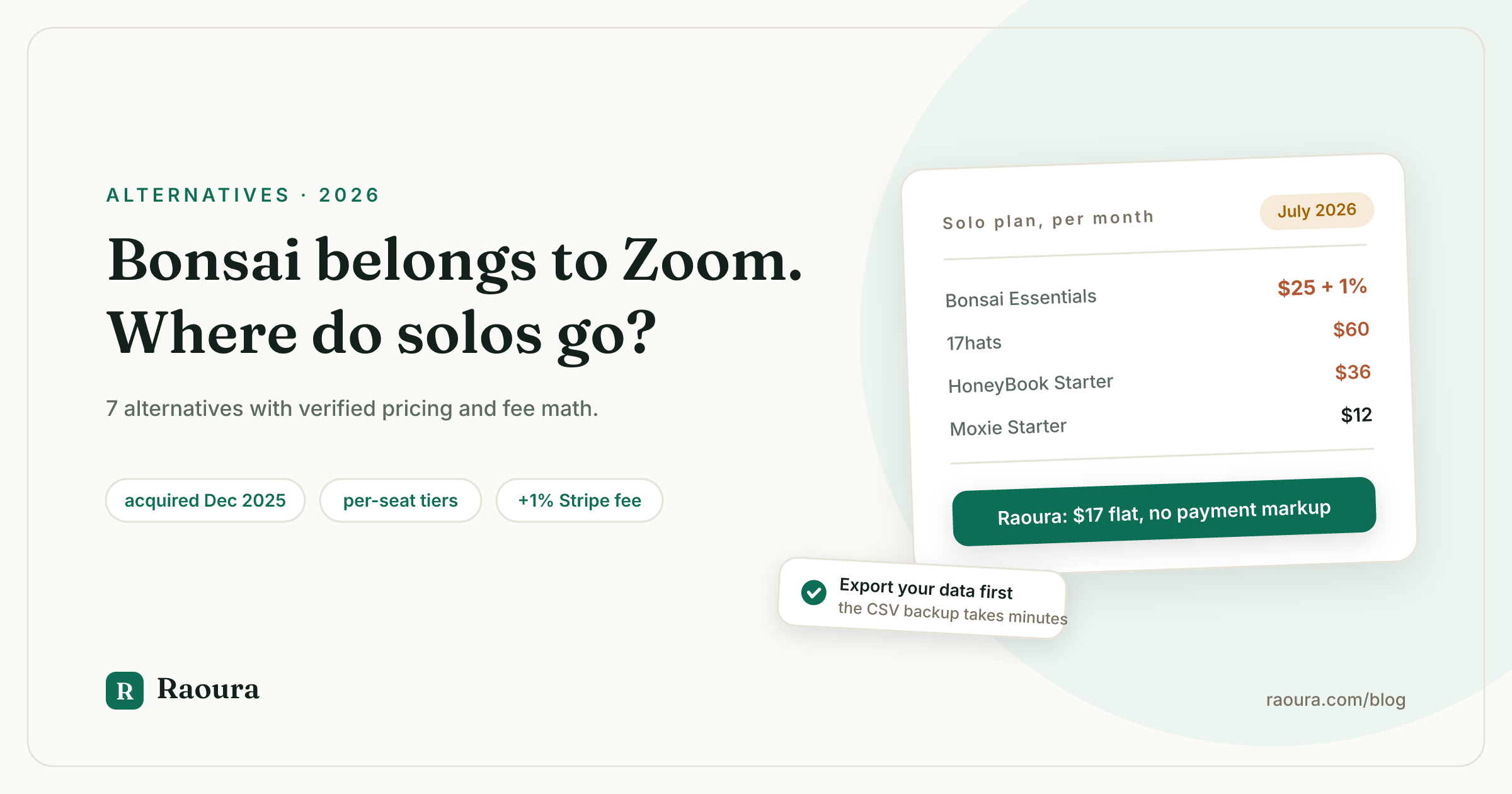
If you searched "Bonsai alternatives" and landed on the usual listicles, here is something none of them will tell you: Bonsai is not an independent company anymore. Zoom announced its acquisition of Bonsai on November 5, 2025, and the deal closed in December 2025, per Zoom's own announcement. Bonsai's footer now reads "Bonsai, a Zoom company."
We checked in July 2026: of the four top-ranking pages for "bonsai alternatives", zero mention the Zoom acquisition, eight months after it was announced. Several were updated after the deal closed. All of them put their own product at #1. That is the state of the advice you are getting.
This article covers what the acquisition actually means for a solo freelancer, what Bonsai costs now (including the fees on the help pages rather than the pricing page), how to get your data out, and 7 alternatives with verified mid-2026 pricing.
A disclosure before anything else: this is the Raoura blog, and Raoura appears in the alternatives list below. Read our entry with the same skepticism you would apply to any vendor grading its own homework. Everything else here stands on its own sources.
What the Zoom acquisition means for Bonsai users#
Zoom announced the Bonsai acquisition on November 5, 2025, closed the deal in December 2025 for undisclosed terms, and says it plans to incorporate Bonsai's capabilities "directly into Zoom" over time.
The exact wording from Zoom's announcement is worth reading closely: "Following the close of the transaction, Bonsai will remain a standalone platform, retaining the Bonsai brand. Over time, we look forward to incorporating Bonsai's capabilities directly into Zoom."
"Standalone for now, absorbed over time" is the standard language of every acquisition that eventually changes the product. It might turn out fine. But there are three observable signals that suggest solo freelancers are not the future customer:
- The blog has been quiet since March 2025. As of July 2026, the newest regular article on Bonsai's blog is dated March 13, 2025. The only newer post is the acquisition announcement itself. A content operation that once published constantly went silent eight months before the deal and has not come back.
- The marketing now targets agencies and teams. Bonsai's site today sells "Solutions" for creative agencies, consultancies, engineering and IT firms, and accounting practices. The featured customer story is a 50-person agency. The pricing page pitches "from freelancers to enterprise" and offers dedicated onboarding for teams of 10 or more users.
- The pricing is per seat, with a team-shaped top tier. Every Bonsai plan is priced per user, and the Elite tier requires a 3-user minimum, which only makes sense for teams.
None of this means Bonsai will shut down. It means the product's center of gravity has moved away from you, the one-person business, and its new owner has said in writing that the long-term plan is absorption into a larger platform. If you would rather not find out how that goes from the inside, the rest of this article is for you. We wrote more broadly about acquisition risk in freelance tools in our upcoming piece on what happens to your data when your tool gets acquired.
The AND.CO precedent: why freelancers are nervous#
The last time a freelancer suite got absorbed by a bigger platform, users got a roughly one-month export window before their data was permanently deleted on March 1, 2026.
AND.CO was acquired by Fiverr in 2018 and rebranded Fiverr Workspace in 2021. In early 2026, Fiverr shut it down. Per third-party migration guides published at the time (Fiverr's own Workspace pages now redirect to generic marketing content, so the vendor's record of the shutdown is gone too), the timeline was: final billing on January 31, 2026, a free-access export window through February, and on March 1, 2026, "all access terminated... Data becomes permanently inaccessible. No recovery possible."
Freelancers who had years of contracts, invoices, and client records in Fiverr Workspace had weeks to notice the announcement and act on it. That is the precedent people have in mind when they read "incorporating Bonsai's capabilities directly into Zoom."
To be fair to Bonsai and Zoom: nothing suggests a shutdown is planned, and Bonsai remains a functioning product today. The lesson from AND.CO is not "Bonsai will die." It is that when your business records live inside someone else's roadmap, you want an export you have actually tested, and you want it before you need it.
What Bonsai actually costs in 2026#
A solo freelancer needs Bonsai's Essentials plan at $25 per month ($19 per month billed annually) just to send invoices, and pays an extra 1% platform fee to Bonsai on every payment if they use their own Stripe or PayPal account.
Verified against Bonsai's pricing page in July 2026, all prices per user:
- Basic: $15 per month ($9 annual). Time tracking, tasks, CRM. No invoicing, no proposals, no contracts. For a client-work suite, the entry plan does not include the core of client work.
- Essentials: $25 per month ($19 annual). Adds invoices and payments, proposals and contracts, the client portal, and expense tracking. This is the real starting price for a solo.
- Premium: $39 per month ($29 annual). Adds pipeline, Gantt, client tasks and messaging, profit reports, QuickBooks and Zapier integrations, and removes Bonsai branding. Note that white labeling sits here, at $468 per year on monthly billing.
- Elite: $59 per month ($49 annual), 3-user minimum. That minimum makes Elite effectively $177 per month, a team plan wearing a freelance suite's clothes.
There is no free plan, and the 7-day trial requires a card.
Then there are the payment fees, which live in Bonsai's help center rather than on the pricing page. Bonsai Payments charges 2.9% + $0.30 for cards (3.25% + $0.30 for Amex) and 1% for ACH. If you connect your own Stripe or PayPal instead, Bonsai adds a 1% platform fee on top of the processor's cut. International payments carry a 2.5% currency conversion fee on the invoice amount.
Run that 1% on real revenue: a freelancer collecting $60,000 per year through their own Stripe account pays Bonsai an extra $600 per year, on top of the subscription, for the privilege of using their own payment processor.
Bonsai's Trustpilot profile sits at 4.2 from 618 reviews as of July 2026, with 9% of reviewers giving 1 star, and payment fees are a recurring complaint in that 9%. We wrote about why we think a client tool should never touch your money in Raoura vs Bonsai.
How to export your data from Bonsai#
Bonsai exports account data as CSV files from Settings, one data type per file, covering invoices, clients, expenses, time tracked, and projects.
Per Bonsai's help center: click your profile icon, go to Settings, open Import/Export, and choose "Download Data CSV" for each data type you need.
Two things to know before you rely on that:
- It is CSV only. Your structured records (client list, invoice history, expenses, time logs) come out fine. Your signed contracts and sent proposals are documents, not rows, and the bulk CSV export is not how you preserve them. Download PDFs of every signed contract individually while you still have access. Those are legal records; treat them like it.
- Do it now, not during a migration panic. The export takes minutes. AND.CO users who waited for the shutdown notice did their exports under a deadline. Whatever you decide about staying or switching, having a current backup of your business records costs you nothing.
We will publish a full step-by-step Bonsai migration guide (it is on our roadmap alongside our HoneyBook and Dubsado migration guides).
7 Bonsai alternatives for solo freelancers#
Seven alternatives run from free to $36 per month, and four of the seven charge no platform fee on your payments.
Prices verified against each vendor's pricing page in July 2026 unless noted. Pricing changes; check the linked pages before you commit.
1. Raoura: one flat $17 plan, your own Stripe, no fee markup#
Pricing: $17 per month, one flat plan, everything included. 14-day free trial, no credit card. You connect your own Stripe account and pay Stripe's standard rate; Raoura adds nothing on top.
What it is: proposals (templates plus AI drafting), e-sign contracts, invoicing with deposits, partial payments and automatic overdue reminders, projects with client-approvable milestones, and a branded client portal with magic-link login. Built only for solo freelancers.
Why it is a fit for Bonsai leavers specifically: the two loudest Bonsai complaints are the tier ladder (invoicing starts at $25, white label at $39) and the payment fees (1% penalty for using your own Stripe). Raoura's answer to both is structural: one plan with everything including white-label branding, and your money flows through your own Stripe account, so there is no platform fee for us to charge. Disclosure: Raoura is our product, so weigh this entry accordingly.

The answer to Bonsai's 1% own-Stripe fee, printed on the invoice itself: nothing added, paid straight to your Stripe.
Also, honestly: Raoura is smaller than Bonsai on purpose. No automation builder, no built-in scheduling, no team seats, no tax estimates. If Bonsai's agency features are why you are there, Raoura is the wrong answer and the next entries will serve you better. And Raoura is new; judge it on the trial, not on review counts we do not yet have.
Best for: solos doing project work who want proposals, contracts, invoicing, and a client portal at $204 per year flat, versus $300 to $468 for Bonsai's mid tiers.
2. Moxie: the closest like-for-like replacement#
Pricing: Starter $12 per month ($10 annual), Pro $25 ($20 annual), Teams $40, per Moxie's pricing page. No platform fee disclosed on payments.
What it is: a freelancer-only suite with CRM, proposals, contracts, invoicing, time tracking, scheduling, and automations on Pro. Moxie's Trustpilot rating is 4.8 from 526 reviews as of July 2026, the best score in this category, and visible right next to Bonsai's 4.2 on Trustpilot's own comparison suggestions.
Best for: freelancers who want Bonsai's breadth (including time tracking, which Raoura lacks) without per-seat pricing. If you want the most feature-complete swap, start here. See our full Raoura vs Moxie comparison for how we stack up against them.
Tradeoffs: automations require Pro at $25. Moxie went through its own leadership change in 2025 (founder to board, new CEO), so apply the same ownership-watchfulness this article applies to Bonsai.
3. HoneyBook: the big ecosystem, post-hike prices#
Pricing: Starter $36 per month, Essentials $59, Premium $129 on monthly billing; $29, $49, and $109 per month billed annually, per HoneyBook's pricing page and help center. HoneyBook processes your payments itself: cards from 2.9% + $0.25, ACH 1.5%. US and Canada only.
What it is: the biggest name in client management for creatives, with a scheduler, lead forms, template marketplace, and community. Note that HoneyBook raised prices up to 89% in February 2025 (Starter went from $19 to $36), per its own help center, so the old "affordable HoneyBook" reputation is out of date. We track the details in our HoneyBook price increase guide.
Best for: US and Canada freelancers in session-based businesses (photographers, coaches) who will use the scheduler, lead pipeline, and marketplace enough to justify $348+ per year.
Tradeoffs: you are trading Bonsai's fee structure for another platform that processes your money, at a higher subscription price, and its Trustpilot score is 3.5. If fees and lock-in pushed you off Bonsai, HoneyBook is a sideways move. More options in our HoneyBook alternatives roundup.
4. Dubsado: automation depth, if you will build it#
Pricing: Starter $335 per year, Premier $525 per year, per Dubsado's pricing page (monthly billing exists; the page quotes annual, so check current monthly rates there). Unlimited clients and projects on both plans. No payment markup disclosed; it routes through Stripe, Square, or PayPal.
What it is: the deepest form-and-workflow builder in the category. People who invest the setup weeks build remarkable systems.
Best for: freelancers leaving Bonsai for ownership or fee reasons who still want heavy automation and customization, and who enjoy building systems.
Tradeoffs: the setup curve is real enough that a paid economy of Dubsado setup specialists exists. If you want to send an invoice this afternoon, this is not that. Our Raoura vs Dubsado comparison covers the setup-time math, and our Dubsado migration guide exists if you later leave.
5. 17hats: all-inclusive, at an all-inclusive price#
Pricing: one plan at $60 per month or $600 per year, with frequent first-year promos around 50% off, per 17hats' pricing page. Payments via Stripe and Square, no platform markup stated.
What it is: a veteran small-business OS with deep automations, SMS reminders, and phone-first workflows, popular with photographers and session-based businesses.
Best for: solos who genuinely run their business on automations and will use the full toolkit. The single-plan structure means no Bonsai-style feature gating.
Tradeoffs: $600 per year at full freight is the most expensive recurring price on this list, and the first-year discount makes year two the number to budget. We compared cheaper options in 7 17hats alternatives.
6. Indy: the budget pick with a real free tier#
Pricing: a free plan with 3 proposals, contracts, and invoices per month, and a Pro Bundle around $12.50 per month on a two-year plan ($300 billed upfront) or about $25 month to month, per Indy's pricing page. Check the billing toggles; the cheap headline number is the two-year rate.
What it is: proposals, contracts, invoicing, tasks, files, and a client portal in a simple package.
Best for: part-timers and starters for whom 3 documents a month is real life, making the price $0.
Tradeoffs: lighter than Bonsai on depth, and the publishing pace of Indy's own product updates has slowed, so apply the same maintenance-watchfulness this article is about.
7. Plutio: no transaction fees, but count your clients#
Pricing: Core $19 per month (capped at 9 active clients per month, solo only), Pro $49 (unlimited clients, 30 contributors), per Plutio's pricing page. Their pricing page states plainly: "We don't take a cut of your invoice payments."
What it is: an all-in-one workspace (projects, proposals, contracts, invoicing, forms, client portal) that leans project-management-first.
Best for: solos with a handful of concurrent clients who want PM depth plus client docs, and zero payment fees.
Tradeoffs: the 9-active-client cap on Core is easy to hit, and the jump to Pro is $49. The interface is dense compared to everything else on this list.
Quick comparison#
| Tool | Solo entry price (verified July 2026) | Fee on your payments | Watch out for |
|---|---|---|---|
| Bonsai (staying) | $25/mo Essentials ($19 annual) | 2.9% + $0.30 cards; +1% if you use own Stripe; 2.5% FX | Per-seat tiers, Zoom absorption plan |
| Raoura | $17/mo flat | None; your own Stripe at cost | No automation builder, scheduler, or team seats |
| Moxie | $12/mo Starter ($10 annual) | None disclosed | Automations need Pro ($25) |
| HoneyBook | $36/mo Starter ($29 annual) | 2.9% + $0.25 cards; 1.5% ACH | Price, US/Canada only, 3.5 Trustpilot |
| Dubsado | $335/yr Starter | None disclosed | Weeks of setup |
| 17hats | $60/mo or $600/yr | None stated | Year-two price after the promo |
| Indy | Free (3 docs/mo); ~$25/mo Pro | None disclosed | Cheap rate requires 2-year commit |
| Plutio | $19/mo Core | None ("no cut") | 9-active-client cap on Core |
Annual math for a typical solo needing invoicing plus white-label branding: Bonsai Premium is $468 per year on monthly billing ($348 annual), before any payment fees. Raoura is $204. Moxie Pro is $300 ($240 annual). That gap recurs every year.
Stay or switch: a 3-question decision#
If you use Bonsai's time tracking, tax tools, or team features weekly, staying is defensible; if you mainly send proposals, contracts, and invoices, you are paying an agency tool's price and fee structure for a solo's workload.
- What did you touch in Bonsai last month? Pull up your account and list it. Most solos land on proposals, contracts, invoices, and somewhere clients can look. If that is your list, every tool above covers it for less.
- How much is the fee structure costing you? If you collect payments through Bonsai with your own Stripe connected, multiply last year's collected revenue by 1%. That number, plus the subscription, is your real Bonsai price. If clients pay you internationally, add 2.5% on those invoices.
- How do you feel about the Zoom sentence? "Over time, we look forward to incorporating Bonsai's capabilities directly into Zoom" is either reassuring or not, depending on how much of your business lives in the product. Whichever way you lean, export your data this week. It is free, it takes minutes, and it converts an acquisition headline from a threat into a non-event.
Frequently asked questions
Who owns Bonsai now?
Zoom. The acquisition was announced on November 5, 2025 and closed in December 2025, for undisclosed terms. Bonsai currently operates as a standalone platform branded "Bonsai, a Zoom company," and Zoom has said it plans to incorporate Bonsai's capabilities into Zoom over time.
Is Bonsai shutting down?
No. As of July 2026, Bonsai is a functioning product and neither Zoom nor Bonsai has announced any shutdown. The reasonable concerns are slower solo-focused development (Bonsai's blog has been quiet since March 2025 and its marketing now targets agencies) and long-term absorption into Zoom, per Zoom's own announcement. Exporting a backup of your data is prudent either way.
How much does Bonsai cost in 2026?
Bonsai has four per-user plans as of July 2026: Basic at $15 per month, Essentials at $25, Premium at $39, and Elite at $59 (3-user minimum), with lower annual rates ($9, $19, $29, and $49). Invoicing, proposals, and contracts require Essentials or higher. There is no free plan.
Does Bonsai charge transaction fees?
Yes. Bonsai Payments charges 2.9% + $0.30 on cards and 1% on ACH. If you connect your own Stripe or PayPal instead, Bonsai adds a 1% platform fee on top of the processor's rate, and international payments carry a 2.5% currency conversion fee, per Bonsai's help center.
What is the best Bonsai alternative for solo freelancers?
For the closest feature match, Moxie ($12 to $25 per month, 4.8 on Trustpilot as of July 2026). For a simpler flat-price tool covering proposals, contracts, invoicing, and a client portal with no payment markup, Raoura at $17 per month is built for exactly that (disclosure: Raoura is our product).
How do I export my data from Bonsai?
Go to your profile icon, then Settings, then Import/Export, and use "Download Data CSV" for each data type (invoices, clients, expenses, time tracked, projects). Signed contracts and proposals should be downloaded individually as PDFs, since the CSV export covers structured records, not documents.
The short version#
Bonsai is a polished product that now belongs to a video conferencing company that has said, in writing, that it plans to fold Bonsai into itself over time. Its editorial pulse stopped in March 2025, its marketing now chases agencies, and its fee structure charges you 1% for using your own payment processor. If you use its full breadth, stay and keep a fresh export. If you are a solo paying agency-tool prices to send proposals and invoices, you have options between $0 and $25 that fit better.
Raoura's offer, with the disclosure repeated: Raoura is our product. Everything a solo needs to sell, contract, invoice, and deliver, for $17 per month on one flat plan, with your payments going through your own Stripe account at cost. The trial is 14 days, fully featured, no credit card.
Try Raoura free for 14 days at raoura.com. Bring a real client project and see if it covers your week.
Pricing and facts verified July 2026 against the linked vendor pages, Zoom's announcement, and Trustpilot. If you spot something out of date, tell us and we will fix it.
Run your client work in one place
Send a proposal, get it signed, invoice, and get paid, with a branded portal your clients will actually use. One flat plan at $17/month, and we never take a cut of your payments.
Try Raoura free for 14 daysNo credit card required. Set up in minutes.
Keep reading
Is Upwork Worth It in 2026? A Break-Even Test for Your Situation
Upwork is worth it when its fee costs less than finding the client yourself, and that is true far more often for a first project than for a repeat client. Here is the break-even math with 2026 numbers: the 0 to 15% fee, Connects, the shrinking client base, and when to wait out the 24-month rule instead of paying to leave.
The Virtual Assistant Contract: 24 Clauses, Scored Against Every Template Ranking for This Search
We scored the four pages that publish actual virtual assistant contract text against 24 clauses a VA agreement needs. Twenty-four of 96 possible slots were filled. The best single template managed 7 out of 24. Twelve clauses appear in none of them, including every clause about the thing that makes VA work different from other freelance work: you are holding your client's passwords and running their inbox. One popular template also tells you a contract fixes your independent contractor status, then mandates client-set 9 to 5 weekday hours in the same document. Here is the clause-by-clause version, with the classification test the DOL is actually applying in 2026, the data protection terms nobody drafts, and the retainer mechanics that decide whether unused hours roll over.
Stripe vs PayPal for Freelancers: Every Fee Verified (2026)
Every page ranking for this comparison either prints in-person retail rates, contradicts itself, or skips the numbers freelancers actually pay. We read the current Stripe and PayPal pricing pages line by line, ran a $3,000 invoice through every rail, and found a $1,764 per year gap between the cheapest setup and the default one.