Why Your Client Tool Should Never Touch Your Money
July 6, 2026
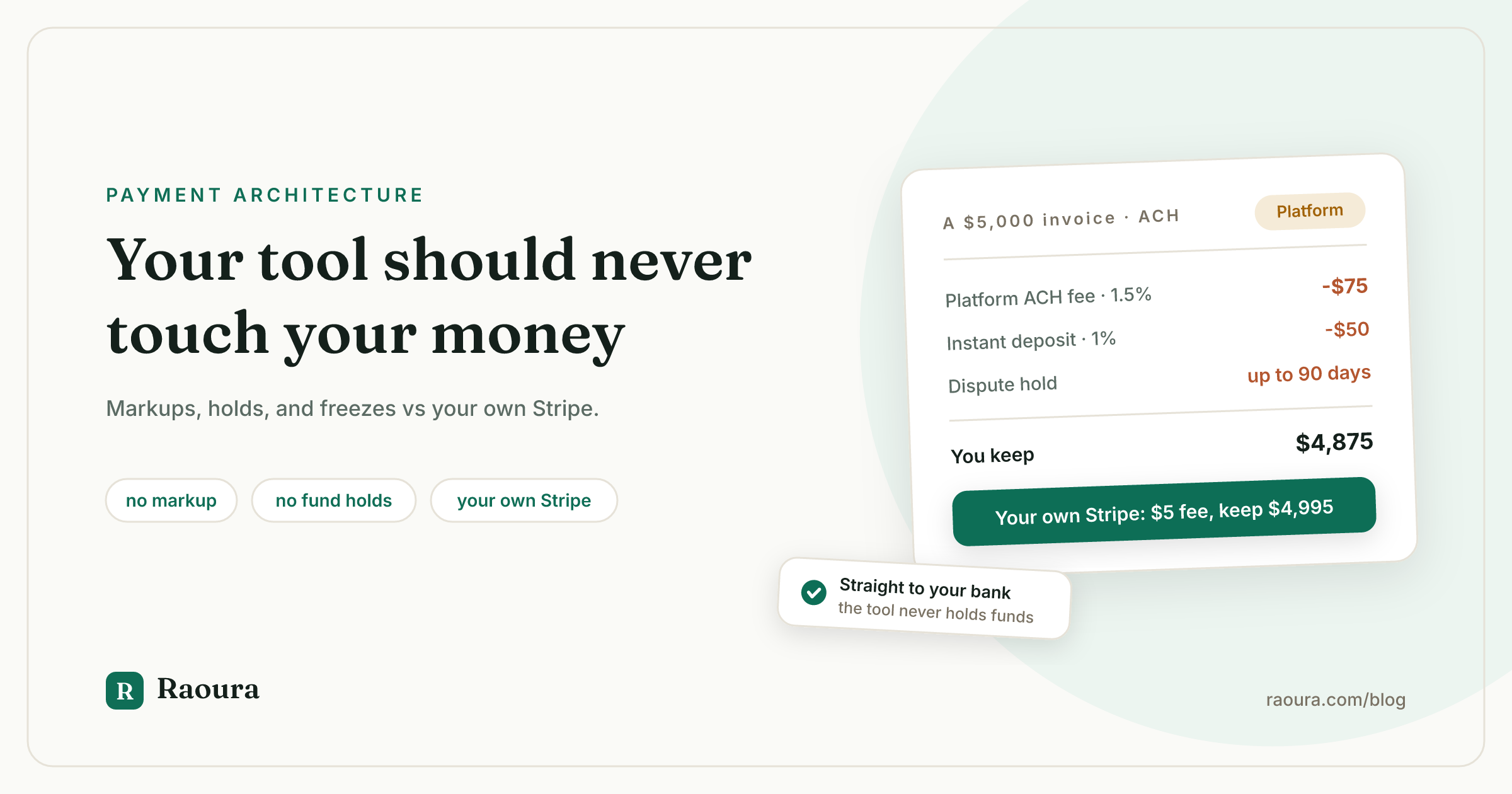
TL;DR: Client management tools handle your payments in one of two ways. Either the platform processes the money itself and sets its own fees (HoneyBook, Bonsai Payments, Wave, PayPal), or it connects your own Stripe account and adds nothing (Dubsado, Moxie, 17hats, Raoura). The first model costs more than the fee table shows: on a $5,000 bank transfer, HoneyBook's 1.5% ACH fee is $75 versus $5 through your own Stripe account, and the platform can hold your funds during a dispute. The second model means your money goes straight from your client to your Stripe account, and no software subscription decision can ever freeze your payouts.
When you compare freelance client management tools, you probably look at the subscription price, then the feature list, and stop there. The fee schedule buried in the help center feels like fine print.
It is not fine print. How a tool handles your money is an architecture decision, and it quietly determines three things: what percentage of every invoice you lose, how long you wait for payouts, and whether a stranger's dispute policy can freeze your income for weeks. This article walks through both models with every number linked to a primary source, so you can check the math yourself.
One disclosure up front: Raoura is our product, and it uses the connect-your-own-Stripe model this article argues for. Every fee below comes from the vendor's own pricing or help pages, checked in July 2026, so you do not have to take our word for anything.
The two payment architectures#
Client management tools handle payments in one of 2 ways: the platform processes payments on its own rails and sets its own fees, or it connects your own Stripe account and adds 0% on top.
In the first model, the platform sits in the money flow. Your client pays the platform's processing arm, the platform deducts its fees, and the platform pays you out on its schedule. HoneyBook, Bonsai Payments, Wave, and PayPal invoicing all work this way. The platform sets the rates, keeps the margin between what it pays its processor and what it charges you, and controls when your money moves.
In the second model, the tool is just an interface on top of a payment account you own. Dubsado, Moxie, and 17hats connect to Stripe (and in some cases Square or PayPal), and the charge happens on your account, at the processor's published rates. Raoura works the same way through Stripe Connect: the payment is processed on your own Stripe account, and Raoura never holds, routes, or touches the funds (disclosure: Raoura is our product).
Here is where the major tools stand, with each fee taken from the vendor's own page in July 2026:
| Tool | Who processes your money | Card fee | ACH (bank transfer) fee | Extras to know about |
|---|---|---|---|---|
| [HoneyBook](https://www.honeybook.com/pricing) | HoneyBook | 2.9% + 25c (3.4% + 9c for card-on-file, Amex, Discover) | 1.5% | 1% fee for instant deposit; discounted card rates only above $500,000/year on Premium |
| [Bonsai](https://help.hellobonsai.com/en/articles/452273-understanding-online-payment-methods-and-fees-at-bonsai) | Bonsai Payments | 2.9% + 30c (Amex 3.25% + 30c) | 1% ($1 minimum) | Extra 1% if you use your own Stripe or PayPal instead; 2.5% FX fee on international payments; 1.5% instant payout |
| [Wave](https://support.waveapps.com/hc/en-us/articles/218323823-Online-payments-processing-fees-and-timelines) | Wave | 2.9% + 60c (Amex 3.4% + 60c) | 1% ($1 minimum) | Fees deducted before payout; ACH payouts take 2 to 7 business days |
| [PayPal invoicing](https://www.paypal.com/webapps/mpp/merchant-fees) | PayPal | 3.49% + 49c via PayPal checkout, 2.99% + fixed fee for cards | 1% (capped at $10) | Limited accounts can have balances held up to 180 days under the [user agreement](https://www.paypal.com/us/legalhub/paypal/useragreement-full) |
| [Dubsado](https://help.dubsado.com/en/articles/8901346-dubsado-payments-processing-fees) | Your processor (Stripe rates passed through, or Square/PayPal) | 2.9% + 30c | 0.8% (capped at $5) | No markup |
| [Moxie](https://help.withmoxie.com/en/articles/4793732-integrate-moxie-with-stripe) | Your own Stripe account | Stripe's rates, "Moxie does not charge anything on top" | Stripe's rates | No markup |
| [17hats](https://help.17hats.com/en/articles/11498904-credit-card-and-ach-processing-fees-in-17hats-bookkeeping-with-stripe) | Your Stripe or Square account | Stripe's rates (their page prints 2.9% + 30c) | Stripe's rates (their page prints a $6.50 cap) | No markup |
| Raoura | Your own Stripe account | [Stripe's published rates](https://stripe.com/pricing) at cost: 2.9% + 30c | 0.8% (capped at $5) | No markup, no holds, no instant-deposit upsell |
Two honesty notes on that table.
First, HoneyBook's pricing FAQ now says card fees "start at 2.7% + 10c" while the plan tables on the same page still show 2.9% + 25c; we report both because HoneyBook publishes both.
Second, the card rates in the first group are not scandalous. HoneyBook's 2.9% + 25c is actually 5 cents cheaper per transaction than Stripe's 2.9% + 30c.
Cards are not where this model costs you. Bank transfers and control are.
What the markup costs on real invoices#
On a $5,000 invoice paid by bank transfer, HoneyBook's 1.5% ACH fee costs $75, while the same transfer through your own Stripe account costs $5 (0.8% capped at $5), a 15x difference.
ACH is the payment method that exposes the platform-rails model, because Stripe prices bank debits at 0.8% with a $5 cap while platforms that resell processing price them as a flat percentage with no cap.
HoneyBook charges 1.5% on bank transfers. Bonsai and Wave charge 1% with a $1 minimum. PayPal's Pay by Bank is 1% capped at $10.
None of them cap anywhere near $5.
Here is our own math on a realistic solo year: $60,000 billed across 24 invoices of $2,500, half paid by card and half by bank transfer.
| HoneyBook rails | Your own Stripe | |
|---|---|---|
| 12 card payments of $2,500 | $873.00 (2.9% + 25c each) | $873.60 (2.9% + 30c each) |
| 12 bank transfers of $2,500 | $450.00 (1.5% each) | $60.00 ($5 cap each) |
| **Total processing for the year** | **$1,323.00** | **$933.60** |
The card column is a wash; the freelancer on their own Stripe account actually pays 60 cents more per year there. The entire $389.40 annual gap comes from bank transfers.
Shift that same $60,000 to all ACH, which is common for retainer clients, and the gap grows to $780 per year ($900 versus $120). That is on top of a subscription that, in HoneyBook's case, starts at $36 per month after the February 2025 increase.
The bigger the invoices, the worse it gets, because the $5 cap does all the work. A $10,000 milestone payment by ACH costs $150 on HoneyBook's rails and $5 on yours. If you bill in milestones, as most freelancers who want to get paid on time should, that difference recurs on every phase of every project.
The risk nobody prices in: holds, freezes, and 90-day waits#
When a platform processes your payments, it can hold your funds during a dispute or account review; HoneyBook's own help center says held payments are applied to open disputes, and BBB complaints on file describe holds described by the complainants as lasting up to 90 days.
This is the part of the architecture that never appears in a pricing table. When the platform is the processor, your money sits in the platform's flow of funds, which means the platform decides when it reaches you.
From HoneyBook's own payment documentation: if a client pays before your bank account is connected, "funds will be held securely until setup is complete." Bank transfers "generally take 7 to 8 days to process."
A payment can carry the status "Held for dispute," meaning it "was applied to the balance of an open dispute," alongside a $10 dispute fee. And "once a payment begins processing, it can't be stopped or expedited."
The complaint record shows what that looks like in practice. HoneyBook's BBB complaint file documents it directly.
- September 2025: a business owner reports having "all funds frozen and payments locked" within a day of a dispute, going four days unable to operate before the account was later shut down "with 0 warning."
- October 2024: a complainant running a seven-figure events business describes HoneyBook holding a $6,000 client payment against an unrelated dispute, writing that the platform "removes all money from any booked contract, without warning and holds it for up to 90 days"; HoneyBook's response confirms the payment was held for dispute recollection.
- February 2024: a complaint describes an account closed entirely because the business type (a mobile cigar bar) fell under the payment processor's restricted-business policy, after payments had already been collected.
To be fair to HoneyBook, its BBB responses make a true point: holding funds during a bank investigation "is standard practice across the payments industry." That is exactly the argument of this article. Every payment processor can hold funds; that is how disputes work.
The question is who your processor is.
When it is your own Stripe account, a dispute freezes one charge, you deal with Stripe directly, and your relationship with Stripe survives switching software. When your client tool is the processor, a dispute can entangle your whole pipeline, your recourse is a support ticket, and leaving the software means leaving your payment history, saved cards, and dispute record behind.
The same failure mode exists at PayPal, whose user agreement permits holding balances of permanently limited accounts for up to 180 days.
If a platform can also decide your business category is no longer welcome, your income depends on a policy you have never read. That is a lot of trust to hand to a project management subscription.
The escape tax: when using your own Stripe costs extra#
Bonsai charges an additional 1% platform fee when you use your own Stripe or PayPal instead of Bonsai Payments, plus a 2.5% FX fee on international payments.
Some tools look like they offer both models. Read the help page.
Bonsai's payment fee documentation says that where Bonsai Payments is available, "utilizing other payment processors, such as Stripe Payments or PayPal, will result in an additional 1% platform fee being added to the payout amount." On the $60,000 year above, choosing your own processor inside Bonsai costs you $600.
The same page notes that enabling Stripe "will create a sub-account in Stripe that is hosted by Bonsai," so even the escape hatch is not a fully independent account, and international payments carry a 2.5% foreign exchange fee.
None of this is hidden, exactly. It is documented, in a help center article, that you would only read after you had already migrated your clients in. It also compounds the concerns we covered when Zoom acquired Bonsai: when a platform's payment rails are a revenue line, every fee is one strategy meeting away from changing.
The pattern to watch for is simple: if using your own payment account is possible but penalized, the tool's business model needs your money to flow through its rails. Price that in.
How the connect-your-own-Stripe model works#
With your own Stripe account connected through Stripe Connect, the charge happens on your account and your fee is Stripe's published rate: 2.9% + 30 cents for cards, 0.8% capped at $5 for ACH.
Stripe built Connect for exactly this pattern: a software platform provides the interface, and the payment is processed on an account the business owns, with "a relationship with Stripe" and the ability "to process charges on their own," in Stripe's words. Stripe's documentation names an online invoicing and payment service as a canonical use case.
In practice, for a freelancer, the flow looks like this:
- You connect or create your Stripe account once, inside the tool.
- Your client pays an invoice by card or bank transfer. The charge is processed on your Stripe account, at Stripe's published rates, with no platform markup.
- Stripe pays out to your bank on your normal Stripe payout schedule. The tool never holds the money, because the money never passes through the tool.
- You keep the full Stripe dashboard: disputes, payouts, saved payment methods, reports. If you ever leave the software, your Stripe account, history, and client payment relationships come with you.
Dubsado, Moxie, and 17hats all follow versions of this model, and it is the whole reason their rows in the fee table say "no markup." Raoura does too: one flat $17 per month plan, your own Stripe account via Stripe Connect, and Raoura adds nothing to processing and cannot touch funds even in principle, because they never route through us (disclosure: Raoura is our product). Raoura costs $17 per month on one flat plan, with no transaction fee markup and no fund holds.

The receipt says it plainly: your client's payment went to your Stripe account, and the software added nothing on the way through.
This is also why we tell people comparing tools to treat the payment architecture as a bigger deal than any single feature. You can live without a scheduler. You cannot live without March's income. Our comparisons with HoneyBook, Dubsado, and Moxie go feature by feature if you want the full picture.
5 questions to ask before you connect payments to any tool#
Run any client management tool through this list before your first invoice goes out on it:
- Who is the processor of record? If the answer is the platform (or a platform-hosted sub-account), your money flows through their rails and their policies. Look for "connect your Stripe account" language and confirm you can log in to your own Stripe dashboard afterward.
- What is the ACH fee, and is it capped? This is the fastest tell. Your own Stripe charges 0.8% capped at $5. Anything quoted as an uncapped 1% to 1.5% means the platform is reselling processing at a margin.
- What happens to my payouts during a dispute? Search the help center for "held," "dispute," and "payout." You want a specific answer before you need one.
- Is there a fee to use my own processor? A penalty for bringing your own Stripe or PayPal tells you the platform's revenue depends on the rails, not the software.
- If I cancel, what happens to my payment history and saved client payment methods? On your own Stripe account, everything survives the switch. On platform rails, ask for the export policy in writing.
Frequently asked questions
Which client management software has no transaction fees?
As of July 2026, Dubsado, Moxie, 17hats, and Raoura add no markup on payment processing; you pay only your processor's own rates, such as Stripe's 2.9% + 30 cents for cards and 0.8% capped at $5 for ACH (disclosure: Raoura is our product). HoneyBook, Bonsai Payments, Wave, and PayPal invoicing all process payments on their own rails at rates they set.
Does HoneyBook charge transaction fees?
Yes. As of July 2026, HoneyBook charges 2.9% + 25 cents for cardholder-entered card payments, 3.4% + 9 cents for card-on-file, Amex, and Discover payments, and 1.5% for bank transfers, plus 1% for instant deposits, per its own pricing page and fee guide. Its pricing FAQ also advertises card fees "starting at 2.7% + 10c."
Can HoneyBook hold my money?
Yes. HoneyBook's help center states that funds are held if your bank account is not yet connected and that payments can carry a "Held for dispute" status, and BBB complaints from 2024 and 2025 describe frozen funds and payout suspensions during disputes. HoneyBook notes in its responses that holding funds during a bank investigation is standard industry practice, which is accurate for any platform that acts as your processor.
What is Stripe Connect?
Stripe Connect is Stripe's system for letting a software platform work with payment accounts its users own. For a freelancer, it means the charge is processed on your own Stripe account, you keep the full Stripe dashboard and direct relationship with Stripe, and the software platform never holds your funds.
Can I avoid the 2.9% card fee entirely?
Not realistically; roughly 2.9% plus a fixed fee is the standard published price for online card processing in the US as of July 2026. What you can avoid is paying more than the processor's rate: uncapped ACH percentages, instant deposit fees for your own money, own-processor penalties, and FX markups are all platform margin, not processing cost.
The one-sentence version#
A client management tool should manage clients. Your money should go from your client's bank to your Stripe account to you, with nobody's product strategy in between. If this article changed which fee schedules you read first, it did its job, and if you want the tool that was built around that rule from day one, Raoura is $17 per month flat with a 14-day trial and no card required (disclosure: Raoura is our product).
All prices, fees, quotes, and complaint records verified July 2026 against the linked primary sources: vendor pricing and help pages, stripe.com, paypal.com, and bbb.org. If a number here goes stale, tell us and we will fix it.
Run your client work in one place
Send a proposal, get it signed, invoice, and get paid, with a branded portal your clients will actually use. One flat plan at $17/month, and we never take a cut of your payments.
Try Raoura free for 14 daysNo credit card required. Set up in minutes.
Keep reading
Is Upwork Worth It in 2026? A Break-Even Test for Your Situation
Upwork is worth it when its fee costs less than finding the client yourself, and that is true far more often for a first project than for a repeat client. Here is the break-even math with 2026 numbers: the 0 to 15% fee, Connects, the shrinking client base, and when to wait out the 24-month rule instead of paying to leave.
The Virtual Assistant Contract: 24 Clauses, Scored Against Every Template Ranking for This Search
We scored the four pages that publish actual virtual assistant contract text against 24 clauses a VA agreement needs. Twenty-four of 96 possible slots were filled. The best single template managed 7 out of 24. Twelve clauses appear in none of them, including every clause about the thing that makes VA work different from other freelance work: you are holding your client's passwords and running their inbox. One popular template also tells you a contract fixes your independent contractor status, then mandates client-set 9 to 5 weekday hours in the same document. Here is the clause-by-clause version, with the classification test the DOL is actually applying in 2026, the data protection terms nobody drafts, and the retainer mechanics that decide whether unused hours roll over.
Stripe vs PayPal for Freelancers: Every Fee Verified (2026)
Every page ranking for this comparison either prints in-person retail rates, contradicts itself, or skips the numbers freelancers actually pay. We read the current Stripe and PayPal pricing pages line by line, ran a $3,000 invoice through every rail, and found a $1,764 per year gap between the cheapest setup and the default one.