HubSpot's 1,000-Contact Limit: What Actually Happens (2026)
August 30, 2026
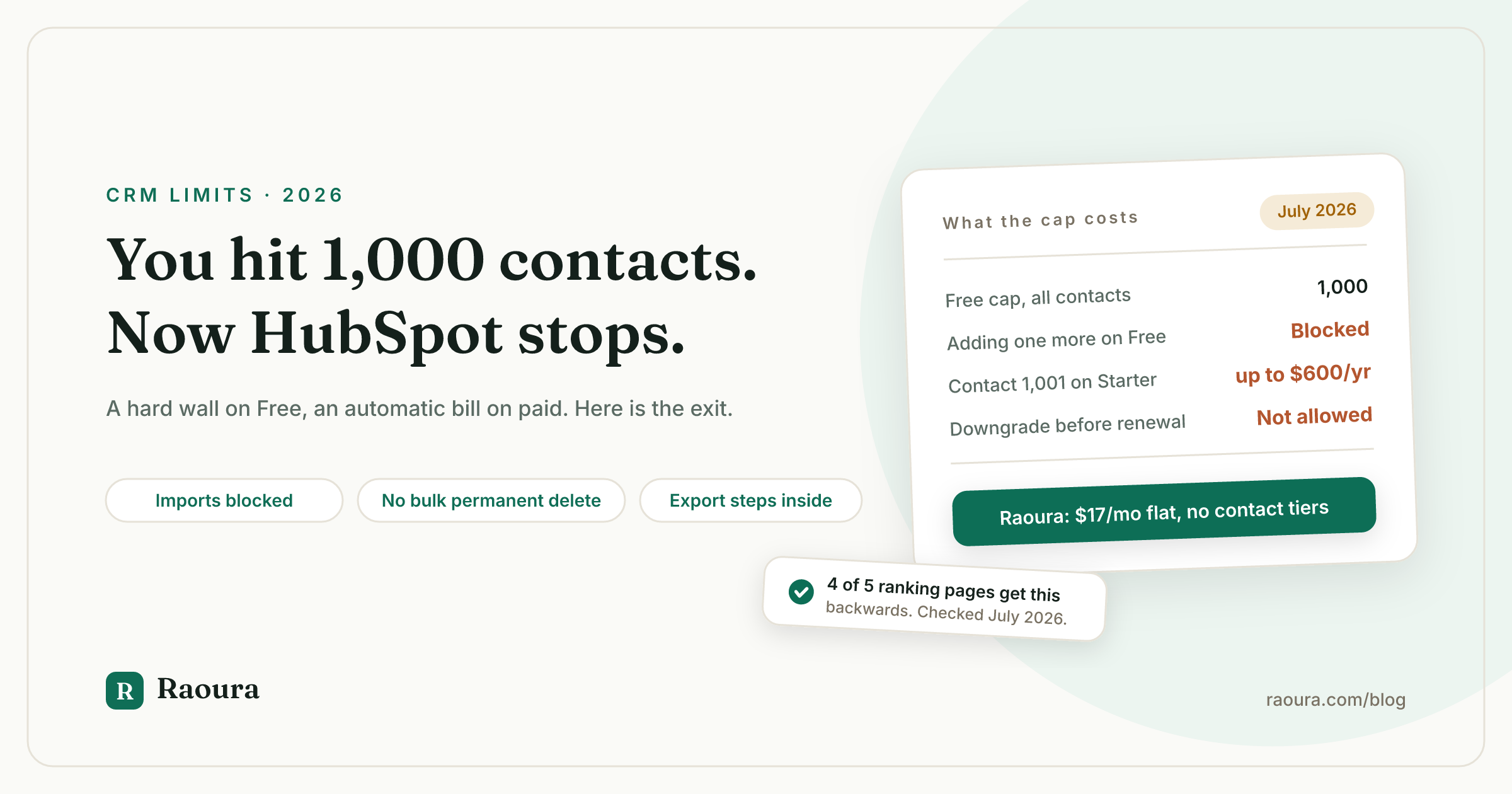
TL;DR: HubSpot Free caps you at 1,000 contact records total, and that cap is a hard block. You cannot create a contact manually, run an import, or let an integration sync one in. On paid Marketing Hub the cap behaves in the exact opposite way: nothing is blocked, you are automatically moved into the next contact tier and billed for it, and HubSpot's own documentation says that upgrade "cannot be prevented" and cannot be reversed until your renewal date.
Crossing from 1,000 to 1,001 marketing contacts on Marketing Hub Starter costs $50 per month for the next block. If you cross it the day after an annual renewal, that one contact costs you $600 before you can downgrade. Deleting contacts does not lower your tier, and there is no bulk permanent-delete button anywhere in HubSpot's interface.
Export first, decide second. Steps are below. Disclosure: Raoura is our product and appears near the end.
You hit a number and the CRM stops being a CRM.
That is the moment most people are searching from when they type "hubspot contact limit," and the pages that rank for it are unusually bad. We fetched the five top-ranking third-party pages in July 2026 and checked every claim against HubSpot's own pricing page, its legal Product and Services Catalog, and its knowledge base.
Four of the five get the single most consequential fact backwards. They tell you HubSpot blocks your emails when you exceed a paid contact tier. HubSpot does not block anything. It bills you. Two of the five still publish a 1,000,000-contact free plan that has not existed for years, one of them repeating it six times including in the meta description that shows up in Google.
So here is the version with the numbers checked.
What the 1,000-contact limit actually is#
HubSpot Free allows 1,000 contact records per account, and that number counts every contact you have, not just the ones you market to.
The limit is written into HubSpot's legal Product and Services Catalog under "Additional Limits of Free Tools," and restated in plain language in the FAQ on the CRM pricing page: "You can add 1,000 contacts, and your free access has no time limit. If you need more than 1,000 contacts, you can upgrade to a paid product."
Two details that trip people up.
First, contacts are the only standard object with a small cap. Companies, deals, and tickets get up to 1 million records each on free accounts, per the same catalog. So a free portal can hold a million deals and only a thousand people.
Second, the free 1,000 has nothing to do with "marketing contacts." Marketing contacts are a Marketing Hub Starter, Professional, and Enterprise concept, per HubSpot's marketing contacts documentation. Free accounts do not have them. Every record in your free portal counts, including the ones you would never email.
What actually breaks when you hit it#
On the free tier, hitting 1,000 blocks contact creation through every route at once: manual entry, CSV import, and API or integration sync.
This is the part no ranking page states plainly. It is not a nag banner. It is an error.
Users in HubSpot's community quote the exact strings: "You've reached your 1,000 contact limit. Create more contacts with Starter Customer Platform," and "You have reached the limit of 1,000 Contact records in your hub."
One user in a 2025 community thread put it simply: "I can't create new and i can't import, due to the limit." In another thread, a Google Contacts sync silently failed on every new contact for roughly six months before the owner noticed.
That last one is the real risk. A blocked import is loud. A blocked integration is quiet, and you find out later that the leads you thought were captured were never stored.
| Where the record comes from | Free tier at 1,000 | Paid marketing tier at the cap |
|---|---|---|
| Manual contact creation | Blocked | Allowed |
| CSV import | Blocked | Allowed |
| API or integration sync | Blocked | Allowed |
| Marketing email sends | Not applicable (free has no marketing contacts) | Not blocked |
| Your bill | Unchanged, stays $0 | Automatically increased to the next tier |
We could not verify one case: whether a form submission still creates a contact once you are at the free cap. No HubSpot documentation addresses it and no community thread we found mentions it. Assume it is blocked and do not build a lead-capture flow that depends on it.
The paid-tier version is the opposite problem#
On Marketing Hub Starter, Professional, and Enterprise, exceeding your marketing contact tier triggers an automatic, unpreventable, non-reversible upgrade that you pay for until your renewal date.
HubSpot's marketing contacts billing page is unambiguous about this: "Contact tier upgrades occur automatically and cannot be prevented once the limit is exceeded." The legal catalog adds: "If you exceed your marketing contacts tier at any time, you will be billed immediately."
The upgrade fires at midnight in your HubSpot subsidiary's timezone. HubSpot's own worked example in that document: you are sitting at 998 marketing contacts, you add 5 more on March 28, and you are moved to the 2,000 tier and billed at that tier until March 15 of the following year.
And deleting the contacts afterward does not help. Same page: "You are billed for the higher contact tier until your subscription's next renewal date, even if your marketing contact count later drops."
Here is what that costs on Starter, using the block prices from the legal catalog:
| Marketing contacts | Price per additional 1,000 per month | Monthly cost above the included 1,000 |
|---|---|---|
| 1 to 1,000 | Included with the $20 per seat plan | $0 |
| 1,001 to 3,000 | $50 | $50 at 1,001 to 2,000; $100 at 2,001 to 3,000 |
| 3,001 to 5,000 | $45 | $145 at 3,001 to 4,000; $190 at 4,001 to 5,000 |
| 5,001 and up | $40 | $230 at 5,001 to 6,000, then $40 per 1,000 |
Run the timing math and it gets uncomfortable. One marketing contact over the line costs $50 a month, and because you cannot downgrade mid-term, crossing the day after an annual renewal locks in twelve of those payments: $600 for a single record. Cross it a week before renewal and the same contact costs you about $12. Nothing about your business changed. Only the calendar did.
Downgrades happen at renewal only. HubSpot requires Professional and Enterprise customers to go through their Contract Manager, and Starter customers to file a support ticket, at least five business days before the renewal date. Miss that window and you carry the tier another full term.
You do get warned. Billing contacts receive notifications within 24 to 48 hours of crossing 75%, 90%, 98%, and 100% of the tier. Those emails go to billing contacts, not necessarily to you.
The one lever that actually works: marketing status#
Non-marketing contacts are free at every paid tier, up to an overall ceiling of 15 million contacts, so the fix is usually reclassification rather than deletion.
Only marketing contacts count toward your billed tier. Per HubSpot's catalog, marketing contacts "can be sent marketing emails and be targeted with ads," and non-marketing contacts cannot. Everything else in the CRM works either way.
Tools that keep working on a non-marketing contact, per HubSpot's marketing contacts documentation:
- One-to-one sales emails
- Sequences
- Registration and event emails
- Ticket kickback emails
- Transactional email
- Feedback surveys
Tools that require marketing status: marketing emails including form follow-ups, contact-segment ad audiences, and the workflow actions for sending email or adding to ad audiences.
There is a timing trap in the switch, and it only runs one way. Setting a contact to marketing takes effect immediately. Setting a contact to non-marketing does not take effect until the start of your next month or your contract renewal, whichever comes first. On a monthly subscription that update date is your renewal date each month; on an annual subscription it is the 1st.
So cleanup is not retroactive. If you are drifting toward the line, reclassify weeks ahead, not the night before.
The delete trap nobody documents#
Deleting contacts to get under the cap runs into three separate mechanics that HubSpot documents in three different places and no ranking page connects.
1. The recycle bin may still count against you#
Standard deletion sends a contact to the recycle bin, where it stays restorable for 90 days. After 90 days it is gone for good, per HubSpot's delete records documentation.
Whether those recycle-bin contacts still count toward your 1,000 is genuinely unclear. A HubSpot employee wrote in a community thread that deleted and merged contacts do not count toward the limit, then qualified it in the same thread: contacts still in the recycle bin "may continue to count toward your object limits until they're permanently deleted."
Both statements cannot be operationally true for someone trying to get unblocked today, and HubSpot has never published a clear answer.
2. There is no bulk permanent delete#
Permanent deletion, which HubSpot used to call GDPR deletion, is the only kind that definitely clears the record. And HubSpot's own documentation says it flatly: "Permanent deletions can only be performed on individual contact records. You cannot perform permanent deletions in bulk using segments of contacts or workflows."
One record at a time. Through the interface. The only bulk route is the batch archive API endpoint, which a HubSpot employee pointed a stuck user toward in a community thread.
Worse, if a contact is already sitting in the recycle bin, you cannot permanently delete it from there. You have to restore it first, then permanently delete it individually.
3. Permanent delete blocklists the email address#
Once an email address is permanently deleted, you cannot re-add it through the interface or through an import. Per that same HubSpot page, the only ways that person comes back are if they submit a form, email a connected team inbox, or are added through the API.
Put those three together and you get the case a developer documented in a 2025 thread after scripting roughly 2,000 individual deletions with AutoHotkey because no bulk option existed: "now that I've individually deleted every single record I'm still getting the same exception message and I'm still unable to create any new records... it may take up to 30 days for these records to be purged, but worse than that there is a blocklist which might prevent me from ever adding them back again. So I'm dead in the water."
The thread is marked Solved.
Phantom caps: people blocked well under 1,000#
Across community threads dated March 2025 to May 2026, free users report the 1,000-contact block firing at 966, 570, 425, 331, and even 0 contacts.
A HubSpot Community Top Expert offered the working theory: "There are occurrences where HubSpot counts the total of assets that have existed towards a limit, not the currently still existing ones... it's not documented... I would consider it a bug."
No official confirmation exists. No official denial does either.
Then comes the catch-22, and it is the detail that tells you the most about where free-tier users sit in the support hierarchy. Free accounts cannot open support tickets, so the Top Expert's practical advice is to buy one month of Starter, roughly $20, purely to earn the right to report the bug. You pay to tell them their product is broken.
Export everything before you decide anything#
Contact export is available on every HubSpot plan including free, and the download link expires in 30 days.
Whatever you decide, do this first. Your client list is the asset; the CRM is just where it currently lives.
Per HubSpot's export records documentation:
- Go to CRM, then Contacts, and open the view you want to export.
- Click Export in the upper right.
- Choose your file format. Pick CSV if your list is large: XLS caps at 65,535 rows and 256 columns, XLSX at 16,384 columns, and CSV has no column cap.
- Under properties, choose all properties rather than "properties in view," and check Include all email addresses so contacts with multiple emails do not lose any.
- Consider a second export with all properties and associations so you keep the links between contacts, companies, and deals.
- Submit. HubSpot emails you a download link.
Then actually download it. The link dies after 30 days, and a CSV over 2MB arrives zipped. HubSpot allows 300 exports per rolling 24 hours with 3 running at once, so a multi-view export plan is fine. Your export history is retained for three years.
One thing to watch on the way out: activity history for a contact is a separate export flow from the contact records themselves. If email threads and call logs matter to you, export those too.
Your four options at the cap, priced#
For a solo freelancer, the cheapest real fix is usually not a HubSpot tier at all, because the 1,000 contacts were never the constraint that mattered.
| Option | What it costs | What it actually solves |
|---|---|---|
| Delete down under 1,000 | $0 plus your time | Temporary. Recycle bin ambiguity, no bulk permanent delete, and the blocklist risk make this unreliable |
| Reclassify contacts as non-marketing | $0, but only on a paid Marketing Hub plan | Real fix if you are paying and over a marketing tier. Not available on free |
| Upgrade to Smart CRM Starter | $20 per seat per month | Raises the record ceiling to 15 million. Does not give you proposals, contracts, or a client portal |
| Export and move to a tool built for client work | $10 to $29 per month typical | Fixes the cap and the underlying mismatch, if your bottleneck is getting paid rather than marketing |
That last row deserves the honest version of the argument. If you are building an email list and running campaigns, HubSpot is a serious marketing tool and the contact tier is the price of it. Pay it or manage it.
But a lot of people hit this wall while using HubSpot as a place to keep client names, because it was free. If that is you, the 1,000 contacts were never the point. The point was proposals, contracts, invoices, and knowing what you are owed. We made that case in full in You Don't Need a CRM. You Need These 5 Things, and the free-tier cost math is in The True Cost of Free CRMs.
Where a solo freelancer's client list actually belongs#
Disclosure: Raoura is our product, so read this section with that in mind.
Raoura is $17 per month flat, one plan, with no contact tiers and no per-seat math. Clients, projects, proposals that become e-signed contracts, invoices with deposits and milestones, and a white-label client portal. Payments run through your own Stripe account, so we never touch your money and never take a cut.
There is no contact limit to hit because contacts are not the billing unit. A freelancer with 40 clients and one with 400 pay the same $17.
!Raoura client list showing every client with their projects, invoices, and status in one view

No contact tiers to cross: your client list is just your client list, at one flat price.

What a freelancer needs on a client record: the work, the paperwork, and the money owed, rather than a marketing status field that decides your bill.
Your HubSpot export drops straight in as a CSV. And if you would rather see the neutral field before deciding, our client portal comparison and minimalist freelance stack guide cover the whole market including tools we do not sell.
Frequently asked questions
What happens when you reach 1,000 contacts in HubSpot Free?
Contact creation is blocked entirely. You cannot add a contact manually, import a CSV, or have an integration sync one in. Nothing auto-bills, because free accounts have no contact tier to be upgraded into. You either delete contacts, upgrade to a paid plan, or move your list elsewhere.
Does the HubSpot free contact limit count all contacts or only marketing contacts?
All contact records, regardless of marketing status. Marketing contacts only exist on Marketing Hub Starter, Professional, and Enterprise. On free, every person in your database counts toward the 1,000.
Does HubSpot block my emails if I exceed my marketing contact tier?
No, and this is the most widely repeated error on this topic. HubSpot automatically upgrades you to the next contact tier and bills you for it. Its documentation states the upgrade "cannot be prevented once the limit is exceeded."
Can I downgrade my HubSpot contact tier after cleaning up my list?
Not mid-term. HubSpot does not downgrade contact tiers before your renewal date, even if your marketing contact count drops back down. Professional and Enterprise customers request it through their Contract Manager and Starter customers through a support ticket, at least five business days before renewal.
Do deleted contacts still count toward my HubSpot contact limit?
HubSpot has not answered this clearly. One HubSpot employee has said deleted contacts do not count, while also saying contacts still in the recycle bin "may continue to count toward your object limits until they're permanently deleted." Permanent deletion is the only version that reliably clears the record, and it cannot be done in bulk.
How do I permanently delete contacts in HubSpot in bulk?
You cannot, through the interface. HubSpot's documentation states permanent deletions can only be performed on individual contact records, not through segments or workflows. The only bulk route is the batch archive API endpoint. Be careful: permanently deleted email addresses are blocklisted and cannot be re-added by import.
How do I export my contacts out of HubSpot?
CRM, then Contacts, open your view, click Export in the upper right, choose CSV, select all properties, and check "Include all email addresses." HubSpot emails you a download link that expires after 30 days. Export is available on all plans including free.
Is there a CRM for freelancers without a contact limit?
Several tools in the $10 to $29 per month range price per account rather than per contact, so there is no tier to cross. Raoura is $17 per month flat with no contact cap (disclosure: it is our product). The broader question is whether you need a CRM at all or just proposals, contracts, invoicing, and a portal.
All limits, prices, and quoted policy language verified July 2026 against HubSpot's pricing page, its legal Product and Services Catalog, its knowledge base, and the linked community threads. Two items are deliberately not asserted here because no primary source confirms them: whether form submissions still create contacts at the free cap, and the date the free tier changed from its older, much larger contact allowance.
Run your client work in one place
Send a proposal, get it signed, invoice, and get paid, with a branded portal your clients will actually use. One flat plan at $17/month, and we never take a cut of your payments.
Try Raoura free for 14 daysNo credit card required. Set up in minutes.
Keep reading
Is Upwork Worth It in 2026? A Break-Even Test for Your Situation
Upwork is worth it when its fee costs less than finding the client yourself, and that is true far more often for a first project than for a repeat client. Here is the break-even math with 2026 numbers: the 0 to 15% fee, Connects, the shrinking client base, and when to wait out the 24-month rule instead of paying to leave.
The Virtual Assistant Contract: 24 Clauses, Scored Against Every Template Ranking for This Search
We scored the four pages that publish actual virtual assistant contract text against 24 clauses a VA agreement needs. Twenty-four of 96 possible slots were filled. The best single template managed 7 out of 24. Twelve clauses appear in none of them, including every clause about the thing that makes VA work different from other freelance work: you are holding your client's passwords and running their inbox. One popular template also tells you a contract fixes your independent contractor status, then mandates client-set 9 to 5 weekday hours in the same document. Here is the clause-by-clause version, with the classification test the DOL is actually applying in 2026, the data protection terms nobody drafts, and the retainer mechanics that decide whether unused hours roll over.
Stripe vs PayPal for Freelancers: Every Fee Verified (2026)
Every page ranking for this comparison either prints in-person retail rates, contradicts itself, or skips the numbers freelancers actually pay. We read the current Stripe and PayPal pricing pages line by line, ran a $3,000 invoice through every rail, and found a $1,764 per year gap between the cheapest setup and the default one.