Bonsai vs Moxie (2026): pricing, fees, and two companies in transition
August 30, 2026
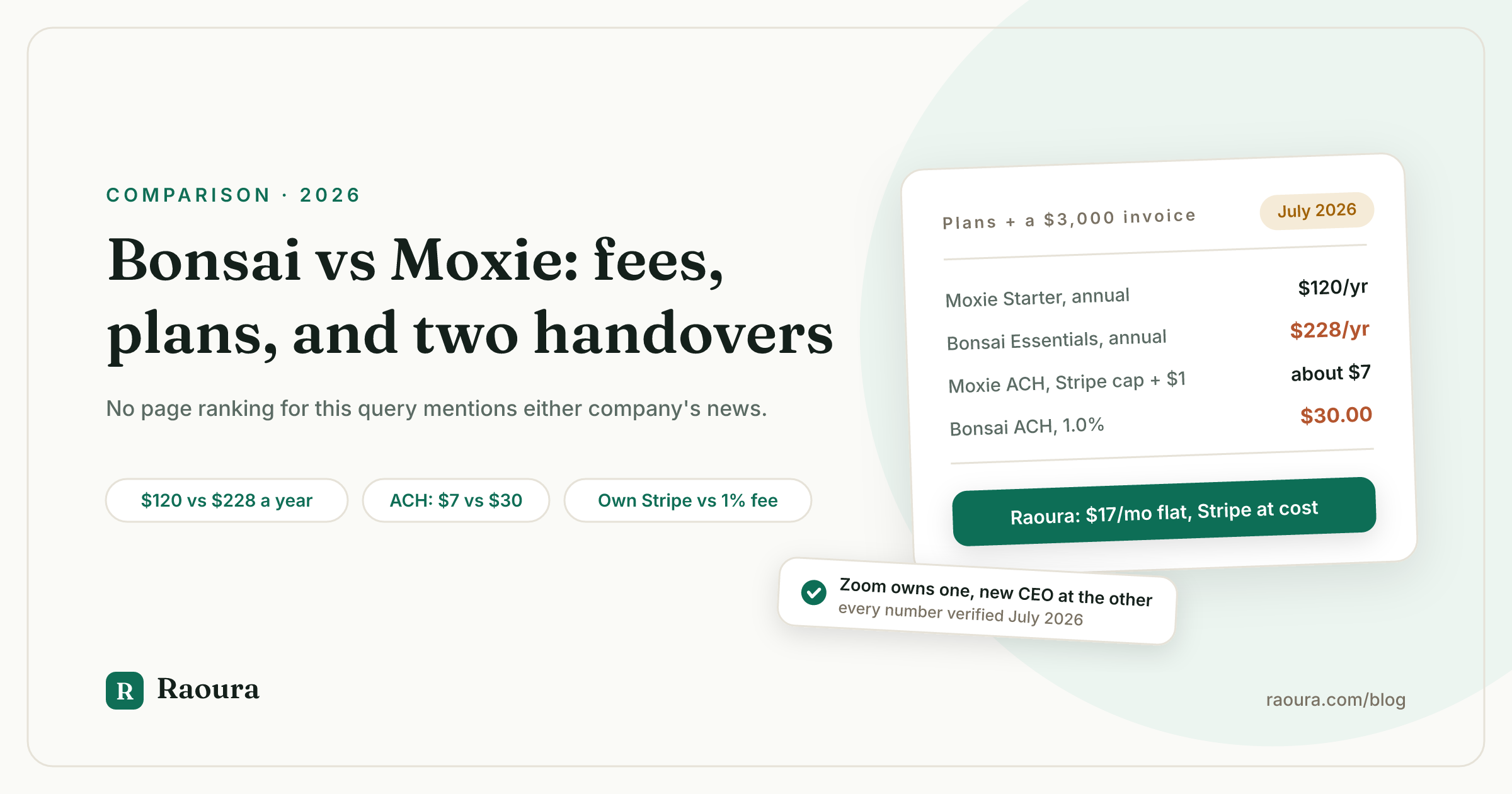
TL;DR: Bonsai costs $15 to $59 per user per month on monthly billing ($9 to $49 on annual), but its cheapest plan cannot send an invoice: invoicing, proposals, and contracts start on Essentials at $228 per year on annual billing. Moxie costs $12 to $40 per month across three plans, and its cheapest plan, $120 per year on annual billing, includes invoicing, proposals, contracts, time tracking, basic accounting, scheduling, and an AI assistant. The bigger structural difference is money handling: Bonsai processes payments itself (1.0% on bank transfers) and adds a 1% platform fee if you route around it with your own Stripe, while Moxie only works through your own Stripe or PayPal account and adds no markup beyond $1 on ACH payments. And two facts no page ranking for this query mentions: Zoom acquired Bonsai in November 2025 and is pivoting it toward agencies, and Moxie's co-founder moved to the board in June 2026 after acknowledging product development had slowed. Disclosure: Raoura, our $17 per month flat-price tool, appears at the end of this comparison.
Search "Bonsai vs Moxie" and here is what actually ranks as of July 2026: Moxie's own comparison page, which quotes Bonsai plan names and prices ($17 Starter, $32 Professional, $52 Business) that do not exist on Bonsai's pricing page. A Millo article last touched in January 2024 that describes a two-tier Moxie and Bonsai plans called "Workflow" that were retired years ago. A Plutio page updated February 2026 that gets the prices right but claims Bonsai's cheapest plan includes invoicing (it does not). And the freshest of them, an April 2026 page from Agiled, which repeatedly calls Moxie's middle tier "Starter ($29/month)", a price Moxie has never charged.
None of those pages mention that Zoom bought Bonsai, announced November 5, 2025 and closed a month later. None mention that Moxie replaced its CEO in June 2026. Those are arguably the two most important facts in this comparison, because you are not just picking a feature grid, you are picking which company holds your contracts, invoices, and payment history for the next several years, and both of these companies are mid-transition.
So this article does the boring thing: every number below was checked against the vendors' own pricing and help pages in July 2026, with links. Where we could not verify something first-hand, we say so and leave it out of the tables.
Bonsai vs Moxie at a glance#
As of July 2026, the cheapest plan that can send an invoice costs $228 per year on Bonsai (Essentials, annual billing) and $120 per year on Moxie (Starter, annual billing).
| Bonsai | Moxie | |
|---|---|---|
| Plans (annual billing, per month) | Basic $9, Essentials $19, Premium $29, Elite $49, all per user | Starter $10, Pro $20, Teams about $32 ($385/yr) |
| Plans (monthly billing) | Basic $15, Essentials $25, Premium $39, Elite $59, all per user | Starter $12, Pro $25, Teams $40 |
| Pricing model | Per user; Elite has a 3-user minimum | Per plan; Teams covers up to 5 people |
| Invoicing on cheapest plan | No; starts on Essentials | Yes |
| Free trial | 7 days, no free plan | 14 days |
| Payment processing | Bonsai Payments (US, UK, Canada, Australia); own Stripe or PayPal allowed but with a 1% platform fee added | Your own Stripe or PayPal only; no markup from Moxie |
| Card fees | 2.9% + 30c; Amex 3.25% + 30c | Stripe's standard 2.9% + 30c |
| ACH (bank transfer) fees | 1.0%, $1 minimum, no cap | Stripe's capped ACH fee plus a $1 Moxie verification fee, about $7 per payment |
| Time tracking | Every plan, from Basic up | Every plan |
| Basic accounting | Expense and income tracking on Essentials and up | Every plan |
| Client portal | Essentials and up | Every plan; white label and custom domain on Pro |
| AI features | No AI plan features listed; promotes Bonsai MCP (connect Claude, ChatGPT, Gemini to your Bonsai data) | Moxie AI assistant on every plan |
| Country availability | Sold internationally; Bonsai Payments in US, UK, Canada, Australia | Sold globally; ACH is US only |
| Last major price event | None found this run | None found this run |
| 2025 to 2026 company news | Acquired by Zoom (announced November 5, 2025, closed December 2025); blog frozen since March 2025 apart from the acquisition post | Founder moved to board, new CEO (June 2026); blog active |
Sources: Bonsai pricing, Bonsai payment fees help article, Zoom acquisition announcement, Moxie pricing, Moxie supported payment methods, all fetched July 2026.
Pricing: the invoicing catch vs the stacked Starter#
Bonsai's headline $9 per month price cannot send an invoice, so its real entry price for a freelancer is $228 per year, which is nearly double Moxie's fully equipped $120 per year Starter.
Here are the current plans, verified on both pricing pages this month:
| Plan | Monthly billing | Annual billing | Cost per year (annual) |
|---|---|---|---|
| Bonsai Basic | $15/mo per user | $9/mo per user | $108 |
| Bonsai Essentials | $25/mo per user | $19/mo per user | $228 |
| Bonsai Premium | $39/mo per user | $29/mo per user | $348 |
| Bonsai Elite | $59/mo per user | $49/mo per user | $588 (3-user minimum, so $1,764 in practice) |
| Moxie Starter | $12/mo | $10/mo | $120 |
| Moxie Pro | $25/mo | $20/mo | $240 |
| Moxie Teams | $40/mo | about $32/mo | $385 |
Three things the side-by-side hides.
- The invoicing catch. Bonsai Basic includes time tracking, task management, a CRM, a service library, and unlimited clients and projects, but invoices and payments, proposals, contracts, forms, scheduling, and the client portal all start on Essentials, per Bonsai's pricing page. If you freelance, you invoice, so treat $228 per year as Bonsai's real entry price, not $108. This is also the single most repeated error on pages ranking for this query: Plutio's February 2026 comparison states that Basic includes proposals, contracts, and invoicing, and Bonsai's own pricing page says otherwise.
Moxie takes the opposite approach and stacks its cheapest plan. Starter at $120 per year includes client and project management, invoicing and payments, proposals and contracts, time tracking, a sales pipeline, basic accounting, a form builder, meeting schedulers, and the Moxie AI assistant, per Moxie's pricing page. The features Moxie holds back for Pro are the agency-flavored ones: a white-label portal on your own domain, workflow automations, a business phone line, QuickBooks sync, and API access.
- The pricing models diverge the day you stop being solo. Bonsai charges per user on every plan and its Elite tier has a 3-user minimum, so a contractor seat doubles your bill. Moxie charges per plan, and Teams covers up to five people for $385 per year. Solo today, the difference is academic; it stops being academic the first time you hire help.
- Neither company has run a price increase we could find in the recent record, which makes this comparison unusual among freelance tools (HoneyBook raised prices up to 89% in February 2025, a story we track in our HoneyBook price increase guide). The pricing risk here is forward-looking instead: Bonsai's prices are now Zoom's decision to make, which is where the company news section below comes in.
Payment fees: opposite philosophies about your money#
On a $3,000 invoice paid by bank transfer, Bonsai's fee is $30 and Moxie's is about $7, and the gap widens with invoice size because Bonsai charges an uncapped 1.0% while Moxie passes through Stripe's capped ACH fee plus $1.
This is the deepest structural difference between the two products, and no page ranking for the query explains it.
Bonsai processes payments itself through Bonsai Payments in the US, UK, Canada, and Australia. Its fee schedule lists cards at 2.9% + 30c (Amex 3.25% + 30c), ACH at 1.0% with a $1 minimum, instant payouts at an additional 1.5%, and a 2.5% fee on international payments. Bonsai does let you connect your own Stripe or PayPal account, but where Bonsai Payments is available, doing so adds "an additional 1% platform fee" to the payout (1.35% for Amex through Stripe). Read that twice: on Bonsai, using your own Stripe costs more than using Bonsai's processor.
Moxie is the mirror image. There is no Moxie processor at all: you connect your own Stripe or PayPal Business account, and Moxie's help center states plainly that "we do not charge any additional fees on top of credit card processing fees." Cards run at Stripe's standard 2.9% + 30c. For ACH, Moxie's payment methods article lists Stripe's capped ACH fee plus a $1 per-payment charge that covers Plaid bank verification, which works out to about $7 on any sizable transfer. One caveat we owe you: that help article was written in June 2023 and its Stripe ACH figures ($6 cap) do not match Stripe's current published rate of 0.8% capped at $5, so confirm the exact cents before you rely on them. ACH through Moxie is US only.
Here is what that means at freelancer invoice sizes, paid by ACH:
| Invoice amount | Bonsai ACH fee (1.0%, $1 min) | Moxie ACH fee (Stripe cap + $1) |
|---|---|---|
| $500 | $5.00 | about $6 |
| $1,000 | $10.00 | about $7 |
| $3,000 | $30.00 | about $7 |
| $10,000 | $100.00 | about $7 |
Below roughly $700 an invoice, the two are a wash. Above it, Bonsai's percentage keeps climbing and Moxie's flat fee does not. A freelancer collecting $60,000 per year over 20 bank-transfer payments hands Bonsai about $600 per year in ACH fees; the same payments through Moxie cost about $140. On cards the two are identical to the cent, since both ultimately run Stripe-level rates. Why we think a client tool should never sit between you and your money is a longer argument we make in Why your client tool should never touch your money.
Features: what each plan actually gates#
Bonsai gates invoicing itself behind its $228 per year second tier, while Moxie gates only agency-style extras (white label, automations, phone line, API) behind its $240 per year Pro plan.
Where Bonsai is ahead#
Depth per dollar once you are on the right tier. Essentials at $228 per year buys invoicing and payments, proposals and contracts, Bonsai's very large template library, forms, scheduling, a client portal, and expense and income tracking. Premium at $348 adds a deals pipeline, Gantt views, profit reports, branding removal, and the integrations most solos eventually want: QuickBooks, Zapier, Calendly, and Google. Time tracking and task management are included from Basic up.
Bonsai's template empire (contracts, proposals, and forms by niche) remains a real asset, and its integrations tier is broader than Moxie's. For the AI-curious there is also Bonsai MCP, which lets you connect Claude, ChatGPT, or Gemini directly to your Bonsai data, a genuinely novel angle that no ranking page has noticed (Agiled's April 2026 comparison states Bonsai has no AI features).
Where Moxie is ahead#
Completeness at the entry price, and a structurally cheaper relationship with your money. Starter includes nearly everything a solo needs, including two things Bonsai reserves for higher tiers (basic accounting) or does not offer at all in plan form (an AI assistant on every plan). Pro at $240 per year undercuts Bonsai Premium at $348 while adding a white-label client portal on your own custom domain and a business phone line in the US, Canada, and UK.
The pass-through payment model covered above is not a feature toggle, it is the business model: Moxie does not earn a percentage when your client pays you, so it has no incentive to keep you on an expensive rail. And Moxie is freelancer-only by positioning, while Bonsai's pricing page now leads with "over 5,000 agencies and consultancies."
What both gate#
Branding removal. On Bonsai, removing "Powered by Bonsai" sits on Premium at $348 per year; on Moxie, the white-label portal and custom domain sit on Pro at $240 per year. If looking fully independent in front of clients matters to you, price the tier that does it, not the entry tier.
What neither vendor will tell you: an acquisition and a handover#
Within eight months of each other, Bonsai was acquired by Zoom (November 2025) and Moxie replaced its CEO (June 2026), and as of July 2026 no page ranking for this comparison mentions either event.
Company trajectory matters as much as this month's feature grid, because switching costs are real: contracts, invoice history, and client records do not move themselves.
On the Bonsai side: Zoom announced the acquisition on November 5, 2025, and the transaction closed in December 2025. Zoom says Bonsai "will remain a standalone platform, retaining the Bonsai brand," and in the same post says it looks forward to "incorporating Bonsai's capabilities directly into Zoom" over time. The signals around the announcement point one direction: Bonsai's pricing page leads with agencies and consultancies, offers reduced rates for teams with 30+ users, and its blog has published exactly one post since March 2025, the acquisition announcement. Bonsai's site footer now reads "Bonsai, a Zoom company." None of that means Bonsai gets worse for solos tomorrow. It does mean the company's center of gravity is moving somewhere you are not, and the roadmap now answers to a video conferencing company. If that concerns you, we keep a current list of Bonsai alternatives written specifically around the acquisition question.
On the Moxie side: in June 2026, co-founder Geoff Mina moved to the board of directors and Scarlett Riu, a 20-year tech operator, became CEO. In the announcement, the company was candid that "things have been on the slower side for the product over the last several months" and framed the new leadership as a step toward "accelerating product innovation again." Credit for the honesty, which is rare in this category, and the blog has stayed active where Bonsai's froze. But if you pick Moxie in 2026, watch a quarter of releases before you move your whole business in, because the acceleration is a promise, not yet a track record.
Here is the honest frame for both: Bonsai is a frozen publisher inside a giant acquirer, and Moxie is an active publisher recovering from a slow patch. Neither company can write this section about itself, and, as of July 2026, no page ranking for this comparison has written it either.
The three-year math#
Over three years, a bank-transfer-heavy solo freelancer pays about $2,484 all-in on Bonsai Essentials versus about $780 on Moxie Starter, a 3.2x gap driven mostly by payment fees.
Here is a worked example for a solo freelancer collecting $60,000 per year across 20 ACH payments of about $3,000 each, on current annual pricing:
| Cost over 3 years | Bonsai Essentials | Moxie Starter |
|---|---|---|
| Subscription | $684 | $360 |
| ACH processing fees | $1,800 | $420 |
| Total | $2,484 | $780 |
Subscription math: Bonsai Essentials $228 per year and Moxie Starter $120 per year, times three. Fee math: 1.0% of $60,000 is $600 per year for Bonsai; 20 payments at about $7 each is $140 per year for Moxie. Note that on Bonsai the three-year processing fees ($1,800) cost more than twice the three-year subscription ($684). A card-heavy business will see almost no fee gap at all, since both run Stripe-level card rates, and the comparison then collapses to $228 versus $120 per year in subscription.
For context, and with the plain disclosure that Raoura is our product: the same three years on Raoura's single $17 per month plan is $612 in subscriptions plus about $300 in at-cost Stripe ACH fees through your own Stripe account, roughly $912 all-in. We publish that math the same way we publish the incumbents'.
That is $132 more than Moxie Starter over three years, so price alone does not send you to Raoura. What the difference buys: a trial with no card on file, milestones your client approves and pays one at a time with deliverables that open on payment, retainers that auto-charge through your own Stripe, time tracking and billable expenses on the same plan, and no tier above it. If Moxie Starter already covers what you do, take it; we say the same in Raoura vs Moxie.
So which one should you pick?#
Choose Bonsai if you want the deepest template and integration library and can accept the Zoom unknowns; choose Moxie if you want the most complete cheap plan and your own payment processing; choose something simpler if you would use less than half of either.
Choose Bonsai if#
You live in templates and integrations (QuickBooks, Zapier, Calendly, Gantt views), you want time tracking and a CRM alongside invoicing, and you are comfortable that a newly acquired product stays good for solos while its marketing chases agencies. Go in at Essentials, not Basic, since Basic cannot invoice, and budget for the 1.0% ACH fee or the 1% platform fee if you insist on your own Stripe. Our head-to-head against it is here: Raoura vs Bonsai.
Choose Moxie if#
You want invoicing, proposals, contracts, time tracking, accounting, and scheduling at $120 per year, you invoice meaningful amounts by bank transfer (against Bonsai, the flat ACH fee saves you more than Moxie Starter's entire $120 subscription once you collect roughly $16,000 per year that way), you want a white-label portal on your own domain for $240 per year, or you simply refuse to let your client tool profit from your payments. Go in with open eyes about the leadership transition and watch the changelog for a quarter. Our head-to-head is here: Raoura vs Moxie.
Consider neither if#
Your actual needs are proposals, contracts, invoices, milestones, and a client portal, and the rest of both feature grids would go unused. Bonsai is per-seat software steering toward agencies inside Zoom; Moxie is a strong value mid-rebuild under a new CEO.
That gap is why we built Raoura: one $17 per month flat plan, the five things above, your own Stripe account with fees passed through at cost, and setup measured in an afternoon. Disclosure: Raoura is our product, so weigh this paragraph accordingly. If you are surveying the whole field first, start with Bonsai alternatives now that Bonsai belongs to Zoom or the neutral client portal software test.
Frequently asked questions
Is Bonsai cheaper than Moxie?
No, not for a solo freelancer who needs invoicing. Bonsai's cheapest invoicing-capable plan (Essentials) costs $228 per year on annual billing versus $120 per year for Moxie Starter, which includes invoicing, proposals, contracts, time tracking, and basic accounting. Bonsai's advertised $9 per month Basic plan cannot send invoices, proposals, or contracts.
Did Zoom really buy Bonsai?
Yes. Zoom announced the acquisition on November 5, 2025 and the transaction closed in December 2025. Zoom says Bonsai remains a standalone platform under the Bonsai brand, and that it plans to incorporate Bonsai's capabilities into Zoom over time. Bonsai's site footer now reads "Bonsai, a Zoom company."
What happened to Moxie's founder?
In June 2026, co-founder Geoff Mina moved from CEO to Moxie's board of directors and Scarlett Riu became CEO. The announcement acknowledged that product development had "been on the slower side" in the preceding months. Moxie began life as Hectic in 2020 and rebranded to Moxie in 2022.
Does Moxie charge payment processing fees?
Moxie adds no markup on card payments: you connect your own Stripe or PayPal account and pay their standard rates (Stripe is 2.9% + 30c on US cards). For ACH bank transfers, Moxie's help center lists Stripe's capped ACH fee plus a $1 per-payment bank verification fee, about $7 total on a sizable transfer. ACH is US only.
What are Bonsai's payment processing fees?
Through Bonsai Payments: 2.9% + 30c on most cards, 3.25% + 30c on Amex, 1.0% on ACH bank transfers with a $1 minimum, plus 1.5% extra for instant payouts and 2.5% on international payments. If you connect your own Stripe or PayPal where Bonsai Payments is available, Bonsai adds a 1% platform fee on top of the processor's own charges (1.35% for Amex through Stripe).
Does Bonsai have a free plan?
No. As of July 2026 Bonsai offers a 7-day trial, then you pick one of four paid per-user plans. Moxie's trial is 14 days. Older comparison articles describing free plans or different trial lengths are out of date.
Which has better AI features?
They are different species. Moxie ships an AI assistant on every plan, including its $12 per month Starter. Bonsai lists no AI features on its plans but promotes Bonsai MCP, which lets you connect external AI tools like Claude, ChatGPT, or Gemini to your Bonsai account data. Comparison pages claiming Bonsai has no AI story are describing the plan grid, not the MCP option.
Is there a simpler alternative to both?
If you only need proposals, contracts, invoicing, milestones, and a client portal, simpler flat-price tools cost less and set up faster. Raoura is $17 per month flat with no markup on payments through your own Stripe account. Disclosure: Raoura is our product.
All prices, fees, and claims verified July 2026 against the linked primary sources.
Run your client work in one place
Send a proposal, get it signed, invoice, and get paid, with a branded portal your clients will actually use. One flat plan at $17/month, and we never take a cut of your payments.
Try Raoura free for 14 daysNo credit card required. Set up in minutes.
Keep reading
Still Invoicing From PayPal? What It Costs You Each Year
PayPal invoicing is free to send and expensive to get paid through, but the cost depends almost entirely on which button your client clicks. On $60,000 a year, the same 24 invoices cost you $2,106 through PayPal checkout or $240 through PayPal's own Pay by Bank. Here is the annual math, plus the costs that never show up on the fee page: holds, refunds, and disputes PayPal will not cover for service work.
Raoura vs Hello Bonsai (2026): One Flat Plan vs Four Per-Seat Tiers, Now Under Zoom
Bonsai's useful plan costs $228 a year plus a 1% fee if you keep your own Stripe. Raoura is $204 flat, with retainers, time tracking and expenses on the one plan. Where each wins, with every price checked against the vendor pages.
Is Upwork Worth It in 2026? A Break-Even Test for Your Situation
Upwork is worth it when its fee costs less than finding the client yourself, and that is true far more often for a first project than for a repeat client. Here is the break-even math with 2026 numbers: the 0 to 15% fee, Connects, the shrinking client base, and when to wait out the 24-month rule instead of paying to leave.