Is Dubsado Worth It in 2026? An Honest Verdict After the Price Hike and the 3.0 Beta
August 30, 2026
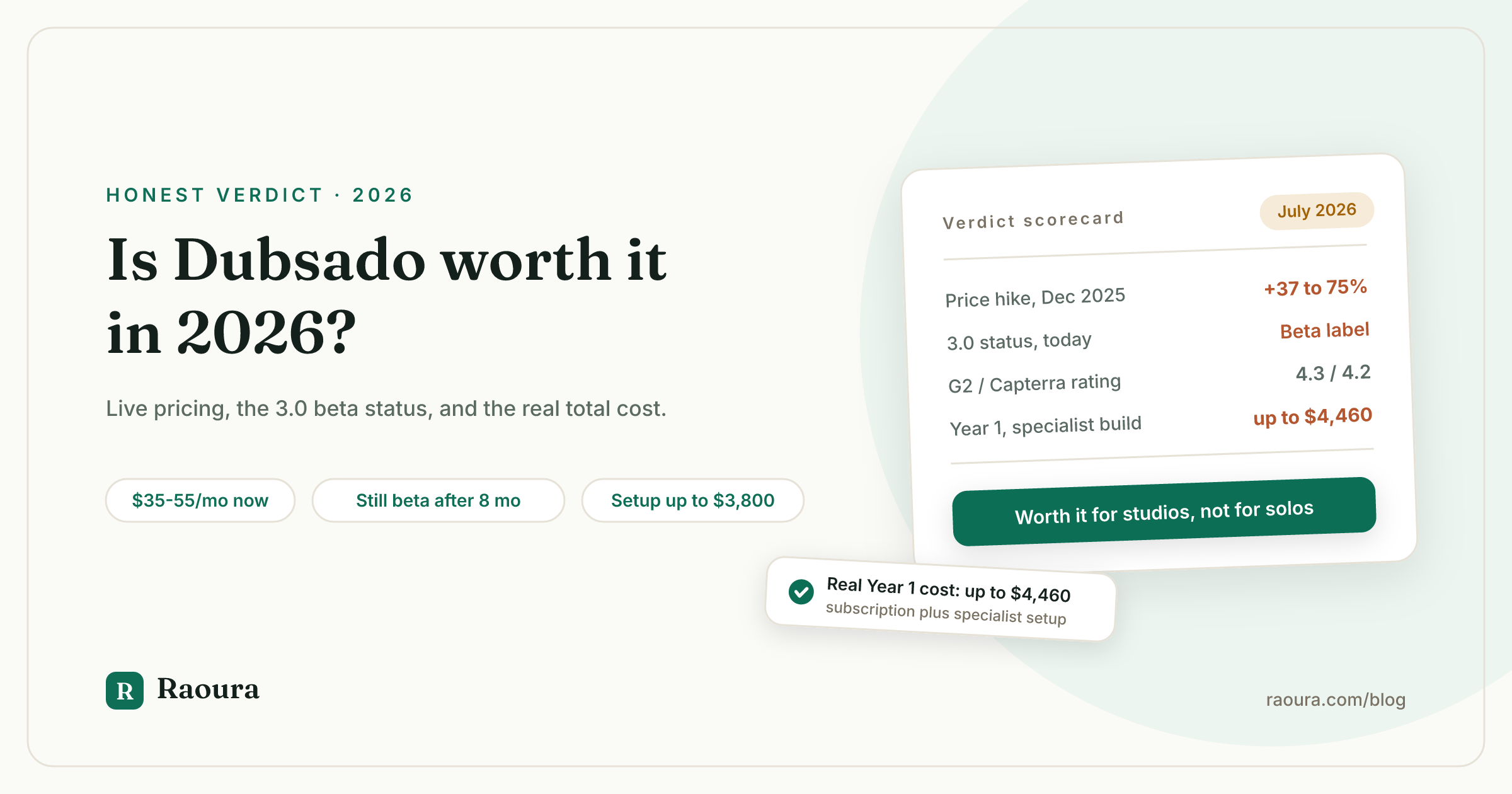
If you typed "is Dubsado worth it" into a search bar, you probably already know the basics: it is the most customizable client management tool in this category, it is not cheap anymore, and it has a reputation for taking a while to set up. What you likely have not found is a straight answer written by someone who does not sell a competing tool and is not just aggregating five-year-old reviews. We checked.
Short answer: Dubsado is worth it if you run an established, multi-service studio that will actually build and maintain custom workflows over years, and it is usually not worth it if you are a solo freelancer who wants to send a proposal today. That verdict has not changed much in the last year, but the price and the product both have, so here is what "worth it" means with the numbers as they stand in July 2026.
What Dubsado actually costs now, and why that changes the math#
Dubsado's Starter and Premier plans cost $35 and $55 a month respectively, up from $20 and $40 before the December 1, 2025 price increase. That is a 75 percent jump on Starter and a 37.5 percent jump on Premier, confirmed directly against Dubsado's own pricing page, which we re-checked today. Paying annually still knocks the effective monthly rate down (Starter runs $335/year, Premier $525/year), but the headline monthly numbers are what most new signups see and budget against.
That price hike alone would not make Dubsado "not worth it". What complicates the math is the cost that never appears on the pricing page at all: getting the thing actually configured. Dubsado's own site links to a directory of Certified Specialists who charge, per our earlier teardown of published specialist rates, $1,500 to $3,800 or more for a done-for-you setup. Nobody is forced to hire one, but the fact that a whole paid profession exists to configure a piece of client software tells you something about the DIY curve.
Put both numbers side by side and "worth it" starts to mean something specific:
| Scenario | Plan | Year 1 subscription | Optional specialist setup | Year 1 total |
|---|---|---|---|---|
| DIY, lightest plan | Starter, monthly | $420 | $0 | $420 |
| DIY, full plan | Premier, monthly | $660 | $0 | $660 |
| Specialist-built, low end | Starter, monthly | $420 | $1,500 | $1,920 |
| Specialist-built, high end | Premier, monthly | $660 | $3,800 | $4,460 |
A solo freelancer paying full price for a Premier plan and a full specialist build is looking at roughly $4,460 in year one before a single client has paid a dollar through the system. That is the number "is Dubsado worth it" actually needs to answer against, not the $35 sticker price.
Is Dubsado 3.0 actually finished, or still a beta?#
As of today, July 18, 2026, Dubsado's own login page still describes 3.0 as "the beta" and an "optional opt-in", eight full months after it started rolling out to existing users between November 17 and 21, 2025. We confirmed this by loading dubsado.com/login directly rather than trusting an older screenshot, because a "worth it" verdict written on stale information is worse than no verdict at all.
That framing matters for a buying decision. It means new signups in mid-2026 are choosing between a "legacy 2.0" that Dubsado has said will no longer receive feature releases, and a rebuilt 3.0 (new Flows workflow builder, a redesigned inbox, AI summaries) that its own maker still won't call final. We covered the specific breakage and fixes in our Dubsado 3.0 problems tracker; the short version is that most launch-week bugs are resolved, but a handful of features from 2.0 are still missing in 3.0, and the beta label itself has simply not moved in eight months.
If you are evaluating Dubsado today, budget time to rebuild on 3.0 rather than assuming the on-ramp you read about in a 2024 review still applies.
What real users actually say#
Dubsado holds a 4.3 out of 5 rating on G2 from 76 reviews and 4.2 out of 5 on Capterra from 61 reviews, but neither number reflects the product most buyers will actually sign up for today. Here is why: most of the underlying reviews on both platforms predate the December 2025 price increase and the 3.0 rebuild, so a rating built mostly on the old $20/$40 product and the old interface is being applied, unlabeled, to a $35/$55 product still in beta.
| Source | Rating | Review count | Last updated | What it does not tell you |
|---|---|---|---|---|
| [G2](https://www.g2.com/products/dubsado/reviews) | 4.3 / 5 | 76 | July 13, 2026 | No adjustment for pre-hike, pre-3.0 review mix |
| [Capterra](https://www.capterra.com/p/206389/Dubsado/reviews/) | 4.2 / 5 (Ease of use 3.7, Support 4.3) | 61 | June 3, 2026 | Same gap; reviews span back to 2020 |
| [Trustpilot](https://www.trustpilot.com/review/dubsado.com) | Not statistically meaningful | 1 | April 2025 | Sample size too small to use |
The one theme that shows up consistently, across both review platforms and independent hands-on write-ups, is the learning curve.
- Jamie S., via Capterra: described Dubsado as "a major endeavor for setup," adding that two years in they still had features they had never turned on.
- Yelle B., via Capterra: called the learning curve "severe" enough that "there are people who literally specialize in Dubsado setup as part of their career."
- Independent testing from competing tool Assembly and a competitor teardown from Taskip (estimating 15 to 20 hours of configuration for a full build) land on the same conclusion from a different angle: the software is capable, and the capability is the cost.
Who Dubsado is genuinely worth it for#
Taskip's own estimate of 15 to 20 hours to configure a full build means the setup only pays for itself if it saves you more than that every year, which mostly happens at studios running multiple service lines, not solo freelancers running one. Strip away the marketing and the setup-cost fear, and Dubsado earns real, repeat loyalty from one specific kind of buyer: an established studio, often with contractors or a small team, running multiple service lines (say, a photography studio that also sells albums and mini-sessions, or a coach running group programs alongside 1:1 work) where a genuinely custom automated workflow saves hours every single week for years.
If you are going to be running the business in three years, and you enjoy building systems, or you will hire a specialist once and let the build pay for itself over dozens of client cycles, Dubsado's depth is a real asset and the price is defensible.
It is a much harder sell if you are a solo freelancer who wants proposals, contracts, and invoices working this week, not after a 15 to 20 hour build or a four-figure specialist invoice. That gap between "capable" and "ready to use today" is the entire reason alternatives exist. We compare the field, including tools built specifically for solos, in our Dubsado alternatives roundup, and if you have already decided to leave, our weekend migration guide walks through what exports cleanly and what does not.

A working dashboard on day one: no Flows to build, no specialist to hire, just the clients and projects already in the system.
Disclosure: Raoura is our product, and we built it as the direct answer to the setup problem this article is about. We are not a neutral party on that question, which is exactly why every number above about Dubsado's pricing, ratings, and beta status links to Dubsado's own pages or an independent review platform, not to us.
!Raoura client add screen with name, email, and project fields visible, ready to send a proposal

Adding a client and starting a proposal takes a few minutes because there is no automation builder standing between you and the send button.
Where Raoura is a genuinely different bet than Dubsado, not a smaller version of the same one: one flat $17 a month plan instead of a $35/$55 split, nothing to configure before your first proposal goes out, and Stripe payments that go straight to your own account with no added transaction markup. The full side-by-side, including a three-year cost comparison with payment processing fees factored in, is in our Raoura vs Dubsado comparison.
The honest gap in every other "is Dubsado worth it" answer#
Of the top 5 pages currently ranking for this exact query, 2 are published by competing CRM vendors, 1 still quotes pricing that has been wrong for 7 months, and the remaining 2 are review aggregators with no synthesized verdict at all.
One thing worth naming directly, because it is our own observation from checking the current search results this week: of the top pages ranking for this exact query, two are published by competing CRM vendors (their own content teams confirm this in bylines) and end in a pitch for their own product, one is a thin, AI-assisted blog post that still quotes the pre-December-2025 pricing and never mentions 3.0 at all, and the remaining two are G2 and Capterra, which have real review volume but no synthesized verdict and a review corpus that mostly predates both the price hike and the 3.0 beta.
Nobody currently ranking has published an independent verdict using live pricing, current beta status, and the full setup cost. That gap is the reason this article exists.
Verified July 2026. Pricing, ratings, and beta status checked directly against Dubsado's pricing page, login page, G2, and Capterra on the dates cited above; all figures link to their primary source.
Frequently asked questions
Is Dubsado worth it for a photographer just starting out?
Usually not at full price. A new photography business rarely has the multi-service workflow complexity that makes Dubsado's automation pay off, and $420 to $660 a year plus a possible specialist fee is a heavy first-year cost before you have proven the business needs that depth.
Is Dubsado 3.0 out of beta yet?
No. As of July 18, 2026, Dubsado's own login page still labels 3.0 as "the beta" and an optional opt-in, eight months after the November 2025 rollout began. See our 3.0 problems tracker for what has and has not been fixed.
How much does Dubsado really cost with setup included?
Subscription alone runs $420 to $660 in the first year depending on plan and billing cycle. Add a Certified Specialist setup and the realistic first-year total runs $1,920 to $4,460. See our setup cost breakdown for where that money goes.
What do current Dubsado users complain about most?
The learning curve and setup burden, consistently, across G2, Capterra, and independent hands-on reviews. Support quality gets generally positive marks; ease of use does not.
Is there a cheaper way to get what Dubsado does?
It depends what you actually use. If you never touch the custom workflow builder, a flat-priced tool built for solos, like Raoura at $17 a month, or another option in our Dubsado alternatives comparison, gets you proposals, contracts, and invoices without the build.
Run your client work in one place
Send a proposal, get it signed, invoice, and get paid, with a branded portal your clients will actually use. One flat plan at $17/month, and we never take a cut of your payments.
Try Raoura free for 14 daysNo credit card required. Set up in minutes.
Keep reading
Is Upwork Worth It in 2026? A Break-Even Test for Your Situation
Upwork is worth it when its fee costs less than finding the client yourself, and that is true far more often for a first project than for a repeat client. Here is the break-even math with 2026 numbers: the 0 to 15% fee, Connects, the shrinking client base, and when to wait out the 24-month rule instead of paying to leave.
The Virtual Assistant Contract: 24 Clauses, Scored Against Every Template Ranking for This Search
We scored the four pages that publish actual virtual assistant contract text against 24 clauses a VA agreement needs. Twenty-four of 96 possible slots were filled. The best single template managed 7 out of 24. Twelve clauses appear in none of them, including every clause about the thing that makes VA work different from other freelance work: you are holding your client's passwords and running their inbox. One popular template also tells you a contract fixes your independent contractor status, then mandates client-set 9 to 5 weekday hours in the same document. Here is the clause-by-clause version, with the classification test the DOL is actually applying in 2026, the data protection terms nobody drafts, and the retainer mechanics that decide whether unused hours roll over.
Stripe vs PayPal for Freelancers: Every Fee Verified (2026)
Every page ranking for this comparison either prints in-person retail rates, contradicts itself, or skips the numbers freelancers actually pay. We read the current Stripe and PayPal pricing pages line by line, ran a $3,000 invoice through every rail, and found a $1,764 per year gap between the cheapest setup and the default one.