Best CRM for Freelancers in 2026: 9 Tools, Real Prices, and the Fee Math Nobody Runs
August 30, 2026
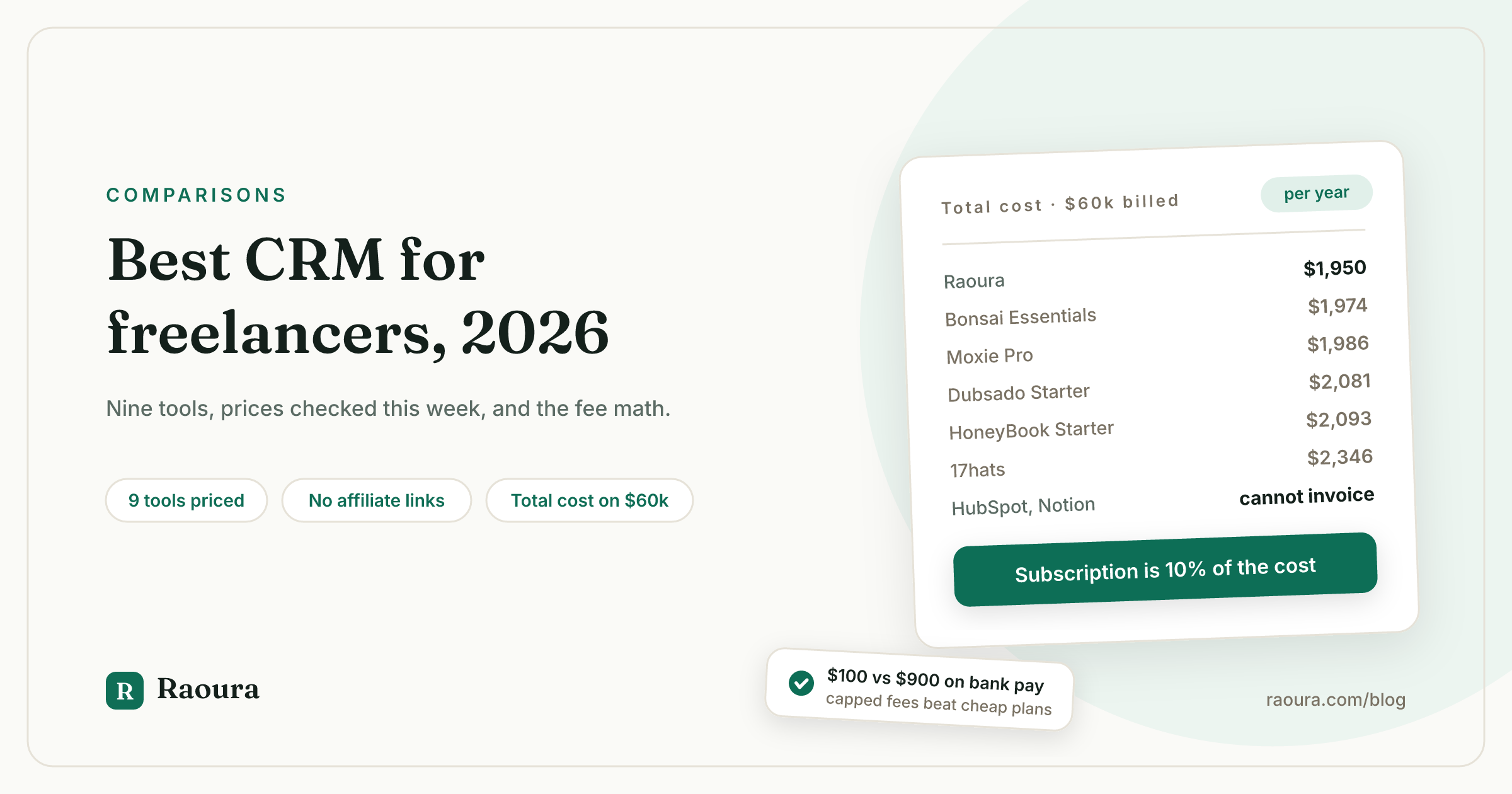
TL;DR: For a solo freelancer, the useful category is not "CRM" at all: it is a tool that carries one client from enquiry to signed contract to paid invoice. The nine tools most often recommended for that job cost between $0 and $600 a year in subscription, and two of them cannot send an invoice at all. On $60,000 of revenue billed across 20 card-paid invoices, the total cost of running your business on them ranges from $1,950 to $2,346, a spread of $396. The payment rails cost more than the software: the same $60,000 collected by bank transfer costs $100 in fees on your own Stripe account and $900 inside HoneyBook. Prices below were checked against vendor pricing pages on July 18, 2026. Disclosure: Raoura is our product and appears in the comparison.
Search "best CRM for freelancers" and you get four results that mostly agree with each other. That agreement is not consensus. It is the same three or four affiliate networks recommending the same tools, plus one page written by a CRM vendor that ranks itself first.
We fetched the top results the week of July 14, 2026 and checked every price against the vendor's own pricing page.
Three of the four had at least one materially wrong number. One of them still lists HoneyBook's starting price at $16 per user, which is 45% below HoneyBook's actual $29 entry plan, and that stale figure is doing a lot of work in their recommendation.
So this article does something different. It states the prices, shows the arithmetic, and names the tools that are not freelancer CRMs at all no matter how confidently they rank for the query.
What "CRM for freelancers" actually means#
A real CRM manages a sales pipeline; what a solo freelancer needs is a tool that carries one client through six steps, and only 7 of the 9 most-recommended tools do more than two of them.
A CRM was built for a sales team: leads, stages, forecasting, rep performance. You are not a sales team. You are the person who does the work, chases the invoice, and would like to know which contract is signed.
The solo workflow is a line, not a funnel:
- Enquiry lands. Someone emails, fills a form, or DMs you.
- Proposal goes out. Scope, price, timeline, in a document the client can accept.
- Contract gets signed. A legally binding e-signature, not a printed PDF scanned on a hotel printer.
- Deposit clears. Before you open the laptop.
- Work happens. Milestones, deliverables, revisions, one place the client can check status.
- Invoice gets paid. Payable in a click, with reminders you did not have to write.
Judge every tool against those six steps. Most "best CRM" lists judge them against pipeline reporting and automation depth, which is why the lists keep recommending software that cannot send an invoice.
We went deeper on this framing in what freelancers actually need instead of a CRM.
The capability matrix#
Of the nine tools most commonly recommended for freelancers, only seven can send a proposal, collect an e-signature, and take a payment without a second subscription.
Here is the same nine judged on the six-step workflow, not on pipeline features.
| Tool | Proposals | Contracts + e-sign | Invoicing | Client portal | Own payment processor | Seat model |
|---|---|---|---|---|---|---|
| Raoura | Yes | Yes | Yes | Yes, white-label | Yes, your Stripe | Flat, one price |
| Moxie | Yes | Yes | Yes | Yes (white-label on Pro) | Yes | Flat |
| HoneyBook | Yes | Yes | Yes | Yes | No, HoneyBook processes | Flat |
| Dubsado | Yes (Premier for public proposals) | Yes | Yes | Yes | Yes | Flat, 3 users included |
| Bonsai | Yes (Essentials and up) | Yes (Essentials and up) | Yes (Essentials and up) | Yes (Essentials and up) | Yes, with a 1% platform fee | Per user |
| 17hats | Yes | Yes | Yes | Yes | Yes, your Stripe or Square | Flat, 3 users included |
| Plutio | Yes | Yes | Yes | Yes | Yes | Flat, 9 active clients on Core |
| HubSpot | No | No | No | No | n/a | Per seat |
| Notion | Only as a document | No | No | Only as a shared page | n/a | Per member |
The last two rows are the honest part that affiliate lists leave out.
HubSpot and Notion appear on nearly every "best CRM for freelancers" list, and neither can send a contract for signature or collect a payment. HubSpot is a marketing and sales platform whose free tier exists to sell you the paid one. Notion is a document tool that will happily hold a client table.
Both are fine at what they do. Neither finishes the job, which means the real price of choosing them is their price plus an invoicing tool plus an e-signature tool. See what HubSpot's free plan really covers for freelancers and the contact limit that eventually forces the upgrade.
The 9 tools, with prices verified July 18, 2026#
Subscription prices for freelancer-focused tools run from $10 to $60 per month, a 6x spread for products that do broadly the same six things.
Prices below are list prices from each vendor's own pricing page, billed annually where the vendor publishes an annual rate. HoneyBook and 17hats were both running promotional banners when we checked; promo pricing is not included, because promo pricing is not what you pay in year two.
1. Raoura, best for solos who want one price and their own Stripe#
$17 per month, flat, one plan. Proposals, contracts with e-signature, invoicing, milestones, and a white-label client portal are all included, because there is nothing to upgrade to. Payments run through your own Stripe account, so Stripe's rate is the rate and we take nothing on top.
Disclosure: Raoura is our product, so weigh this entry accordingly.
The reason we built it this way is in the fee math further down: the tier ladders that other tools use tend to put the client portal and the branding removal one plan above where a solo actually lives.

The client list is the whole "CRM" part for a solo business: who they are, what is active, what they owe, no deal stages or lead scoring.
2. Moxie, best freelancer-native alternative#
$12, $25, and $40 per month billed monthly; $10, $20, and $32 billed annually. Freelancer-only positioning and a genuinely good product. The catch for solos is that the $10 Starter plan excludes the client portal white-labeling, custom domain, and workflow automations, so the working plan is usually Pro at $20 per month annually. Payments run through your own processor.
3. HoneyBook, best for wedding and event professionals#
$29, $49, and $109 per month billed annually ($59 and $129 monthly for the middle and top tiers). Polished, popular, and the deepest bench of templates in the category.
Two things to know before you commit. HoneyBook raised prices up to 89% in February 2025, which is what the price increase guide covers. And HoneyBook processes your payments itself at 2.9% plus 25 cents on cards and 1.5% on bank transfers, with no option to bring your own Stripe. That second fact costs more than the first, and we price it out below.
4. Dubsado, best for complex, form-heavy client intake#
$335 per year for Starter, $525 per year for Premier, with three extra users included. Nothing else in this category matches Dubsado's form and workflow builder.
Two catches. Starter locks out scheduling, automated workflows, and public proposals, so most freelancers who want the thing Dubsado is famous for end up on Premier. And setup is genuinely long: an ecosystem of certified specialists charging $1,500 to $3,000 exists precisely because of it, which we cover in what Dubsado setup actually costs.
5. Bonsai, best template library, worst pricing structure for solos#
$15, $25, $39, and $59 per user per month; $9, $19, $29, and $49 billed annually. The $9 Basic plan cannot send an invoice, a proposal, or a contract, so the real entry point is Essentials at $19 per user annually, and removing Bonsai's branding from client-facing documents requires Premium at $29.
Bonsai also charges a 1% platform fee when you route payments through your own Stripe or PayPal. Zoom acquired Bonsai in November 2025 and the product is being pointed at 10 to 50 person agencies, which is a direction worth knowing about if you are one person. Full breakdown in Bonsai pricing.
6. 17hats, best if you want every module in one plan#
$60 per month, or $600 per year, as a single all-inclusive plan, plus $5 per extra user and $10 per extra brand. There is also a free CRM tier limited to 4 invoices per quarter. 17hats uses your own Stripe or Square with no markup, which is the right architecture, attached to the highest price in the category. See 17hats alternatives.
7. Plutio, best for freelancers who also want task boards#
$19, $49, and $199 per month. The Core plan caps you at 9 active clients per month, which is a real ceiling if you do small projects at volume. Plutio does not publish its payment processing terms on the pricing page.
8. HubSpot, best free contact database, not a freelancer CRM#
Free tools cover up to 2 users and 1,000 contacts. Starter Customer Platform is listed at $20 per seat per month, discounted on an annual commitment. It will store contacts and track email beautifully. It will not send a contract, collect a signature, or invoice anyone, so budget for two more subscriptions.
9. Notion, best for freelancers who want to build it themselves#
Free for a solo user with unlimited blocks; Plus is $10 per member per month. A Notion client database is a legitimate answer to step 1 of the workflow and no answer at all to steps 2 through 6. Good as the free half of a minimalist stack, not as the whole thing.
The cost nobody in the top four results calculates#
On $60,000 billed across 20 card-paid invoices, your platform choice moves $396 a year, but your payment-rails choice moves $800.
Every list ranks these tools on subscription price. Subscription price is the smaller number.
Here is the total annual cost of running a $60,000 freelance business on each tool: the cheapest plan that can actually send a proposal, get a contract signed, and collect a payment, plus the processing fees on twenty $3,000 invoices paid by card.
| Tool | Cheapest working plan (annual) | Subscription per year | Card processing on $60,000 | Total per year |
|---|---|---|---|---|
| Raoura | $17/mo flat | $204 | $1,746 (your Stripe, 2.9% + 30c) | **$1,950** |
| Bonsai Essentials | $19/user/mo | $228 | $1,746 (your Stripe) | **$1,974** |
| Plutio Core | $19/mo | $228 | $1,746 (your Stripe) | **$1,974** |
| Moxie Pro | $20/mo | $240 | $1,746 (your Stripe) | **$1,986** |
| Dubsado Starter | $335/yr | $335 | $1,746 (your Stripe) | **$2,081** |
| HoneyBook Starter | $29/mo | $348 | $1,745 (HoneyBook, 2.9% + 25c) | **$2,093** |
| 17hats | $600/yr | $600 | $1,746 (your Stripe or Square) | **$2,346** |
The math: 2.9% of $60,000 is $1,740, plus 30 cents on 20 transactions is $6, for $1,746. HoneyBook's 25 cent per-transaction fee makes its card total $1,745, marginally cheaper than Stripe's.
Now look at what that table is telling you.
The processing fees are between 74% and 90% of the total cost in every row. The subscription argument that these listicles spend 3,000 words on is a fight over the last 10% to 26%. On card payments, HoneyBook's own processing rate is competitive with Stripe's, and anyone claiming otherwise has not checked.
Two caveats on the table. Dubsado Starter cannot send public proposals, so a freelancer who needs them is on Premier at $525, taking the total to $2,271. And Bonsai's Essentials plan still puts Bonsai's branding on your client documents until you reach Premium at $29 per user.
Where the real money is: bank transfers#
The same $60,000 collected by bank transfer costs $100 in fees on your own Stripe account and $900 inside HoneyBook, a 9x difference driven entirely by whether the fee is capped.
This is the number that should decide your choice, and not one of the four top-ranking results mentions it.
Stripe's ACH Direct Debit is 0.8% capped at $5.00 per transaction. HoneyBook's bank transfer fee is 1.5% with no cap. Bonsai's is 1.0%.
On a single $3,000 invoice:
| Payment rail | Fee on one $3,000 invoice | Fee on $60,000 (20 invoices) |
|---|---|---|
| Your own Stripe, ACH | $5.00 (0.8% hits the $5 cap) | $100 |
| Bonsai, 1.0% bank transfer | $30.00 | $600 |
| HoneyBook, 1.5% bank transfer | $45.00 | $900 |
That $800 gap between Stripe and HoneyBook is more than double the entire spread between the cheapest and most expensive subscription in the previous table. It grows with your invoice size, because the cap does not move.
The lesson is not "HoneyBook is expensive." It is that the question worth asking about any client tool is not what it charges you, but whether it stands between you and your client's money. A tool that uses your own processor cannot skim, because there is nothing to skim from. That argument in full is in why your client tool should never touch your money, and the rail-by-rail comparison is in card vs ACH vs wire for freelance payments.
The per-seat trap#
Four of the nine tools price per seat or per member, which means a one-person business is buying into a pricing model designed to grow with headcount it will never have.
Bonsai, HubSpot, Notion, and Zoho all charge per user. Raoura, Moxie, HoneyBook, Dubsado, 17hats, and Plutio charge flat.
For a solo the difference looks like nothing today. It matters in two places.
First, per-seat vendors tend to gate solo-relevant features behind higher tiers, because their tier ladder is built around team size and permissions rather than around what one person needs. Bonsai's white-label branding sitting on the $29 plan is a clean example.
Second, if you ever bring on a VA or a subcontractor for one project, a flat plan absorbs it and a per-seat plan bills you for it.
What it costs to leave#
None of the nine tools charge an exit fee, but only some let you export signed contracts and client documents, which is the part that matters if you are ever in a payment dispute.
Ask before you commit, not after:
- Can you export clients and projects to CSV?
- Can you download every signed contract as a PDF, with its signature audit trail?
- Do past invoices remain accessible after you cancel, or does the account go read-only or dark?
- If the tool processes your payments, what happens to a payout in flight when you cancel?
That fourth question is the one people learn the hard way. If your money runs through your own Stripe account, cancelling the software has no effect on your payouts, because the money was never in the software.
We wrote migration guides for the three most common exits: leaving HoneyBook, leaving Dubsado, and leaving Bonsai.
Which one to pick#
Match the tool to how you bill, not to how many features it has.
- Project-based creative work (design, video, web, branding). You need proposals, contracts, deposits, and milestones. Raoura, Moxie, or HoneyBook. Pick on price and whether you want to keep your own Stripe.
- Retainer consulting. You need recurring invoices, a client portal for status, and very little else. Raoura or Moxie.
- High-volume small projects. You need speed and no per-client ceiling. Avoid Plutio Core's 9-client cap and any per-seat plan; a flat plan wins.
- Weddings and events. HoneyBook, honestly. Its template library and the way it handles event dates are built for you, and the fee premium may be worth it.
- Complex, form-heavy intake (coaching, therapy, agencies of one). Dubsado Premier, and budget real time for setup.
- You just want a client list and already invoice elsewhere. Notion free, or HubSpot free if you want email tracking. Do not pay for either.
If you are still deciding whether you need this category at all, the honest answer is that under about six clients a year, a spreadsheet and a template folder is a defensible system. Past that, the admin starts costing more than the software.
The client portal is usually what tips it, because it removes the entire category of email that starts with "sorry, can you resend the contract."

One link the client can open without making an account, showing the proposal, the signed contract, the invoice, and where the project stands.
Frequently asked questions
What is the best CRM for freelancers in 2026?
There is no single best, because the category is mislabeled. For solo freelancers who need proposals, contracts, invoices, and a client portal in one place, the strongest options on price and fit are Raoura at $17 per month flat, Moxie at $10 to $32 per month, and HoneyBook at $29 to $109 per month. Traditional CRMs like HubSpot and Pipedrive rank well for this query but cannot send a contract or an invoice. Disclosure: Raoura is our product.
Do freelancers actually need a CRM?
Usually not a CRM, but yes to a client workflow tool once you pass roughly six clients a year. What you need is the six-step line from enquiry to paid invoice, not pipeline stages and lead scoring. A spreadsheet handles the client list fine; what a spreadsheet cannot do is collect a legally binding signature or take a card payment.
What is the cheapest CRM for freelancers?
Free, if you count HubSpot's free tier (2 users, 1,000 contacts) or Notion's free personal plan, but neither can invoice or collect a signature. Among tools that complete the workflow, the cheapest working plans in July 2026 are Moxie Starter at $10 per month annually, Raoura at $17 per month flat, and Bonsai Essentials at $19 per user per month annually. Bonsai's cheaper $9 plan cannot send an invoice.
Is HubSpot good for freelancers?
HubSpot's free tools are a good contact database and a good email tracker, and they are genuinely free up to 2 users and 1,000 contacts. They are not a freelance business system: no proposals, no contracts, no e-signature, no invoicing, no client portal. If you use HubSpot, budget for at least two more subscriptions to cover the rest, which usually costs more than one all-in-one tool.
How much should a freelancer spend on client management software?
A defensible ceiling is one billable hour per month. Most solo freelancers land between $10 and $36 per month for an all-in-one tool. Anything above that should trace to a specific capability you use weekly. On $60,000 of revenue, the difference between the cheapest and most expensive tool in this comparison is $396 a year, while the difference between capped and uncapped bank transfer fees is $800.
Does the software's payment processing fee really matter?
Yes, more than the subscription. Processing fees make up 74% to 90% of the total annual cost of running on any of these platforms at $60,000 of revenue. The single biggest variable is bank transfers: capped at $5 per transaction on your own Stripe account, uncapped at 1.5% inside HoneyBook. On twenty $3,000 invoices, that is $100 versus $900.
Can I use a spreadsheet instead of a freelance CRM?
For the client list, yes, indefinitely. The steps a spreadsheet cannot do are the ones that carry legal or financial weight: a binding e-signature, a payable invoice link, an automatic payment reminder, and a shared status page the client can check without emailing you. Most freelancers switch when chasing those things starts eating a full day a month.
---
All prices in this article were checked against each vendor's own pricing page on July 18, 2026: honeybook.com/pricing, dubsado.com/pricing, hellobonsai.com/pricing, withmoxie.com/pricing, 17hats.com/pricing, plutio.com/pricing, hubspot.com/pricing/crm, notion.com/pricing, and stripe.com/pricing. HoneyBook's payment processing rates are from HoneyBook's own fee documentation at honeybook.com/blog/honeybook-payment-fees. Promotional discounts running at the time of checking are excluded. Verified July 2026.
Run your client work in one place
Send a proposal, get it signed, invoice, and get paid, with a branded portal your clients will actually use. One flat plan at $17/month, and we never take a cut of your payments.
Try Raoura free for 14 daysNo credit card required. Set up in minutes.
Keep reading
Is Upwork Worth It in 2026? A Break-Even Test for Your Situation
Upwork is worth it when its fee costs less than finding the client yourself, and that is true far more often for a first project than for a repeat client. Here is the break-even math with 2026 numbers: the 0 to 15% fee, Connects, the shrinking client base, and when to wait out the 24-month rule instead of paying to leave.
The Virtual Assistant Contract: 24 Clauses, Scored Against Every Template Ranking for This Search
We scored the four pages that publish actual virtual assistant contract text against 24 clauses a VA agreement needs. Twenty-four of 96 possible slots were filled. The best single template managed 7 out of 24. Twelve clauses appear in none of them, including every clause about the thing that makes VA work different from other freelance work: you are holding your client's passwords and running their inbox. One popular template also tells you a contract fixes your independent contractor status, then mandates client-set 9 to 5 weekday hours in the same document. Here is the clause-by-clause version, with the classification test the DOL is actually applying in 2026, the data protection terms nobody drafts, and the retainer mechanics that decide whether unused hours roll over.
Stripe vs PayPal for Freelancers: Every Fee Verified (2026)
Every page ranking for this comparison either prints in-person retail rates, contradicts itself, or skips the numbers freelancers actually pay. We read the current Stripe and PayPal pricing pages line by line, ran a $3,000 invoice through every rail, and found a $1,764 per year gap between the cheapest setup and the default one.