Is Bonsai Worth It in 2026? An Honest Verdict After the Zoom Acquisition
August 30, 2026
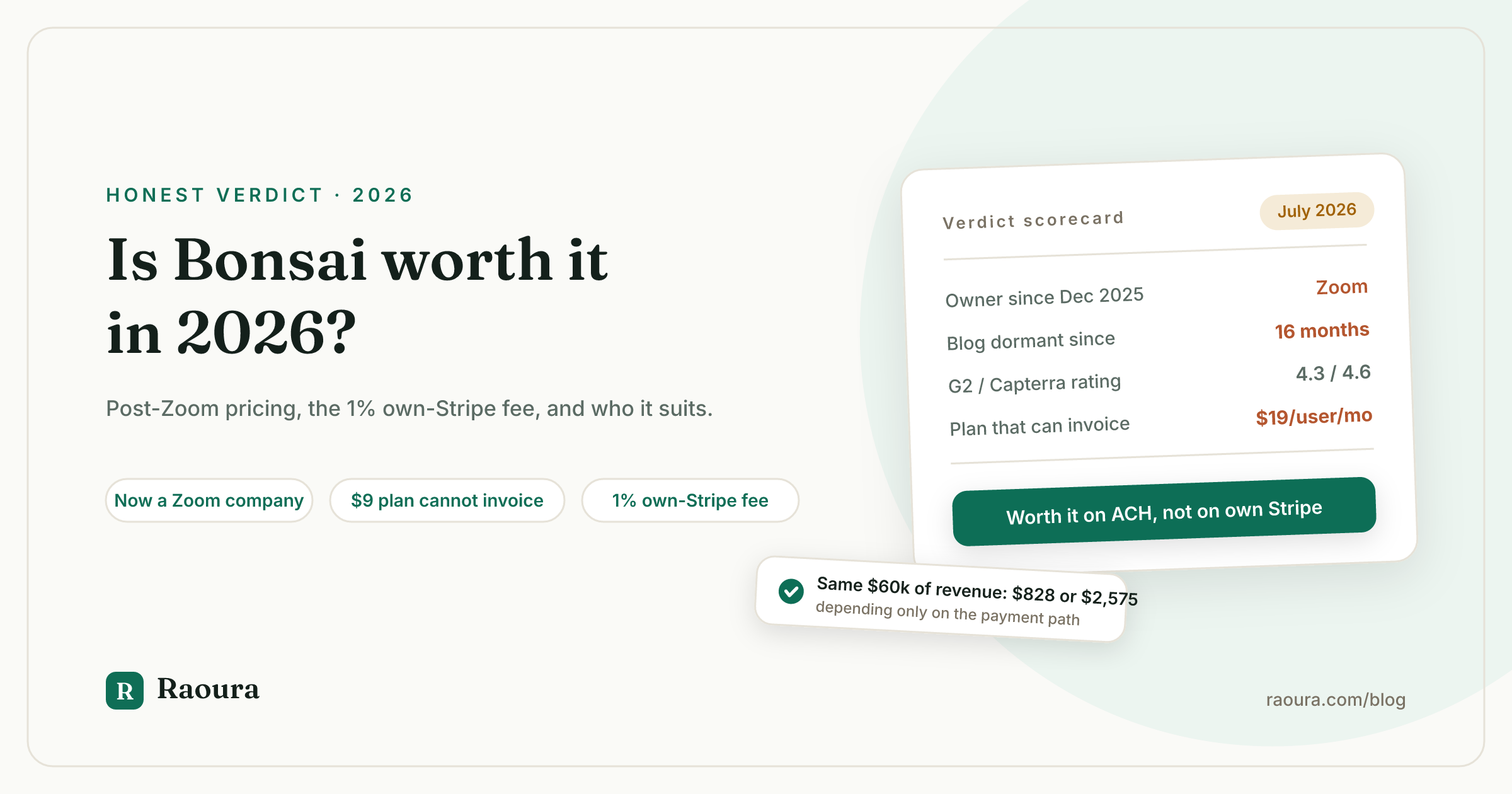
If you searched "is Bonsai worth it," you probably found a page telling you Bonsai has three plans called Starter, Professional, and Business, priced at $25, $39, and $79, with a 14-day trial that needs no credit card.
Every one of those facts is wrong.
Bonsai publishes four plans, named Basic, Essentials, Premium, and Elite, at $9, $19, $29, and $49 per user per month on annual billing. The trial is 7 days and asks for a card. We checked the pricing page today.
That is the state of the "is Bonsai worth it" conversation in 2026: the pages answering the question are working from numbers nobody re-verified, and the single biggest development in Bonsai's history goes unmentioned in most of them.
Short answer: Bonsai is worth it in 2026 if you want a deep template library, your clients pay by ACH inside Bonsai, and you are comfortable being a solo customer of a product now owned by Zoom and marketed to agencies. It is usually not worth it if you bill through your own Stripe account, because that adds a 1% fee to every payment you ever collect.
Here is the full reasoning, with every number linked to the source we checked in July 2026.
The five facts that decide it#
Five things changed or came to light about Bonsai since most review pages were written, and four of them cut against buying it as a solo.
| Fact | Detail | Source |
|---|---|---|
| Zoom owns Bonsai | Announced November 5, 2025, closed December 2025 | [Zoom announcement](https://www.zoom.com/en/blog/zoom-acquires-bonsai/) |
| The blog is dormant | Newest article in the main feed is dated March 13, 2025 | [Bonsai blog](https://www.hellobonsai.com/blog) |
| The cheap plan cannot invoice | Basic at $9 has no invoicing, proposals, or contracts | [Pricing page](https://www.hellobonsai.com/pricing) |
| Your own Stripe costs 1% extra | A Bonsai platform fee stacks on top of Stripe's rate | [Help center](https://help.hellobonsai.com/en/articles/452273-understanding-online-payment-methods-and-fees-at-bonsai) |
| Marketing has moved to agencies | Pricing page cites "over 5,000 agencies and consultancies" | [Pricing page](https://www.hellobonsai.com/pricing) |
None of these is disqualifying on its own. Together they describe a product moving away from the customer asking this question.
What Bonsai actually costs a solo freelancer#
The advertised entry price is $9 per user per month, but the cheapest Bonsai plan that can send an invoice is Essentials at $19 per user per month on annual billing, or $25 month to month.
Basic gets you time tracking, tasks, a CRM, and unlimited clients and projects. What it does not get you is the ability to bill anyone. Invoicing, proposals, contracts, and the client portal all start at Essentials.
Removing Bonsai's branding from the documents you send clients is another step up, to Premium at $29 per user per month.
So the honest entry price for a working freelancer is $228 a year, and the price for a freelancer who wants to look like their own business is $348.
We published the full tier-by-tier teardown, including what the free Limited plan does and does not include, in Bonsai pricing: what free actually includes.
The payment fees are the real cost#
Subscription price is not where Bonsai gets expensive. Payment processing is.
Per Bonsai's help center, Bonsai Payments charges 2.9% plus $0.30 on cards, 3.25% plus $0.30 on American Express, and 1% with a $1 minimum on ACH bank transfers. International payments carry a 2.5% currency conversion fee.
The clause that matters most is the one about bringing your own processor. If you connect your own Stripe or PayPal account in a country where Bonsai Payments is available, Bonsai adds a 1% platform fee on top of whatever your processor charges.
Here is what that does to a solo billing $60,000 a year across 24 invoices:
| Payment path | Subscription | Processing | Total year 1 |
|---|---|---|---|
| ACH through Bonsai Payments | $228 | $600 | $828 |
| Cards through Bonsai Payments | $228 | $1,747 | $1,975 |
| Cards through your own Stripe | $228 | $2,347 | $2,575 |
Card processing is 2.9% of $60,000 ($1,740) plus 24 payments at $0.30 ($7.20). The third row adds the 1% Bonsai platform fee, which is $600 on $60,000 of revenue.
The same $60,000 of revenue costs you $828 or $2,575 inside Bonsai depending only on which payment path you use, a spread of $1,747 a year. That is the single most important number in this article, and it appears on none of the pages currently ranking for this keyword.
Is Bonsai still built for solo freelancers?#
Bonsai's acquisition announcement still says "solopreneurs and small businesses," but its pricing page now leads with "over 5,000 agencies and consultancies," and its top tier requires a minimum of three users.
The evidence points both ways, so here is both sides.
Pointing toward solos: both Zoom's announcement and Bonsai's own version repeatedly name solopreneurs as the audience, and every plan still allows a single seat except Elite.
Pointing toward agencies: pricing is per seat, the Industries navigation is a list of agency verticals, the flagship customer story is a 50-person agency, Elite has a three-user minimum, and the pricing page advertises a reduced rate for teams of 30 or more.
Per-seat pricing is the tell. A product that charges per seat makes more money when you add people, which means the roadmap gets written for the customers who add people. You are not that customer.
What the Zoom acquisition means for you#
Zoom acquired Bonsai on November 5, 2025 and closed the deal in December 2025, with a stated plan to keep Bonsai standalone while folding its capabilities into Zoom Workplace over time.
Zoom's language is worth reading precisely. Bonsai "will remain a standalone platform, retaining the Bonsai brand," while Zoom looks forward to "incorporating Bonsai's capabilities directly into Zoom." The footer now reads "Bonsai, a Zoom company."
Both halves of that can be true, and historically both halves being true is how a product gets absorbed. Standalone today, a feature inside a bigger suite in three years.
We are not predicting that. We are saying the honest answer to "what happens next" is that nobody outside Zoom knows, and that uncertainty is a real input to a buying decision when your client records, contracts, and payment history live inside the product.
The precedent freelancers keep bringing up is AND.CO, which Fiverr bought, rebranded as Fiverr Workspace, and then shut down with a data-deletion deadline. We wrote up that pattern in what happens when your freelance tool gets acquired, and the practical response, exporting your data now regardless of whether you stay, in migrating from Bonsai.
The dormancy signal#
Bonsai's newest blog article in its main feed is dated March 13, 2025, which is 16 months of silence as of July 2026.
A frozen blog is not a broken product. Plenty of good software has a dead content team.
But it is the cheapest available signal about where a company is spending attention, and combined with an acquisition and an agency-facing pricing page, it points the same direction as everything else here.
What current users actually complain about#
Bonsai holds a 4.3 out of 5 across 101 reviews on G2 and a 4.6 across 95 reviews on Capterra, and the loudest recurring complaint in both is payment holds and transaction fees.
Those are solid ratings. Bonsai is not a bad product, and the reviews that praise it consistently praise the same things: the breadth and editability of the contract template library, fast setup, and the time-tracking-to-invoice flow.
The recurring complaints, from G2 and Capterra:
- Payment holds and fees. A verified reviewer in industrial automation wrote that Bonsai "charged me an additional $300 in transaction fees for my first two transactions and would not let me access the fund for over two weeks."
- Support responsiveness. G2 groups seven reviews under poor customer support; Capterra reviews cite no phone support and multi-day replies.
- Cost creep and paywalled features. One reviewer described downgrading a tier for affordability and losing custom branding as a result.
- Bonsai Tax being a paid add-on, which reviewers read as undercutting the all-in-one promise.
- Client portal limitations, particularly limited design control.
One observation of our own. Bonsai's own site advertises "1020+ Reviews" without saying where they are. The two public review platforms we could verify hold 196 reviews between them. We are not calling that number false, only unsourced, and we could not verify it this pass.
Trustpilot returned an empty response for us, so we are not citing a Trustpilot score in either direction.
How Bonsai compares on price#
At $228 a year, Bonsai Essentials undercuts HoneyBook, Dubsado, and 17hats on subscription price, and is the only tool in this table that charges you extra for using your own payment processor.
Entry-tier prices, each verified against the vendor's own pricing page in July 2026, using the annual figure each page displays:
| Tool and plan | Effective monthly | Annual total | Extra fee for own processor |
|---|---|---|---|
| [Moxie Starter](https://www.withmoxie.com/pricing) | $10 | $120 | No |
| Raoura (one flat plan) | $17 | $204 | No |
| [Bonsai Essentials](https://www.hellobonsai.com/pricing) | $19 | $228 | Yes, 1% |
| [Dubsado Starter](https://www.dubsado.com/pricing) | about $28 | $335 | No |
| [HoneyBook Starter](https://www.honeybook.com/pricing) | $29 | $348 | No |
| [17hats](https://17hats.com/pricing) | $50 | $600 | No |
Read that last column before the price column. On $60,000 of revenue, a 1% platform fee is $600 a year, which is more than the entire subscription cost of every row above 17hats.
Bonsai's subscription looks mid-priced. Bonsai's total cost, for anyone using their own Stripe, is the highest here.
The head-to-heads are in Bonsai vs Moxie and Bonsai vs HoneyBook, and the full field is in Bonsai alternatives.
Disclosure: Raoura is our product, and it is the second row. It is one plan at $17 a month with proposals, contracts, invoices, milestone billing, and a white-label client portal all included. Payments run through your own Stripe account, we never touch the money, and there is no platform fee, because taking a percentage of your revenue is not something we think a client tool should do. We wrote out that reasoning in why your client tool should never touch your money.

This payment goes straight to your Stripe account. There is no platform fee layered on top, which is the 1% line Bonsai charges for the same setup.

Bonsai gates the client portal at Essentials and branding removal at Premium. Both are on the only plan Raoura has.
Who Bonsai is genuinely worth it for#
Bonsai is worth $228 to $348 a year for solos who use Bonsai Payments ACH and want the template library, and is a poor deal for anyone billing through their own Stripe.
Buy Bonsai if#
- Your clients pay by ACH and you will use Bonsai Payments. At 1% with no platform-fee stacking, this is Bonsai's genuinely strong configuration, and $828 all-in on $60,000 is competitive.
- You want the template library more than anything else. Bonsai's contract and proposal templates are the most consistently praised thing about it across both review platforms, and that praise is old enough to be durable.
- You are already in the Zoom ecosystem and expect the eventual Zoom Workplace integration to be a benefit rather than a risk.
Skip Bonsai if#
- You bill through your own Stripe or PayPal. The 1% platform fee is a permanent tax on your revenue that grows as you grow, and it is the clearest reason to look elsewhere.
- You are outside the US, UK, Canada, or Australia, where Bonsai Payments is not available, which pushes you into the third-party path and the 1% fee by default.
- Per-seat, four-tier pricing is more structure than your one-person business needs. You will spend real attention working out which tier you are on and what it withholds.
- The acquisition makes you uneasy. That is a legitimate reason and you do not need to justify it further. Export your data and go.
The feature-level version of that comparison is in Raoura vs Bonsai. Disclosure again: Raoura is our product.
The gap in every other answer#
The only page we found ranking for this exact keyword that is about the software rather than the tree published in March 2026, four months after the Zoom deal closed, and does not mention the acquisition once. It also invents three plan names Bonsai does not use, states a trial length that is double the real one, and gates the client portal at the wrong tier.
That is not a competitor being sloppy so much as a category being under-served. A question this commercially loaded should have a current, sourced answer.
This is ours. Every figure above links to a page we opened in July 2026.
Verified July 2026. Pricing, payment fees, trial terms, acquisition dates, blog recency, and review counts checked directly against Bonsai's pricing page, Bonsai's help center, Zoom's acquisition announcement, G2, and Capterra this month. Bonsai's Trustpilot score, the Bonsai Tax add-on price, and the Zoom deal value could not be verified and are deliberately omitted rather than estimated.
Frequently asked questions
Is Bonsai worth it for a brand new freelancer?
Only on the ACH path. A new freelancer on Essentials paying by card is looking at close to $2,000 in year-one subscription and processing on $60,000 of revenue, and probably has not yet proven they need an all-in-one tool at all.
Did Zoom really buy Bonsai?
Yes. Zoom announced it on November 5, 2025 and closed in December 2025. Bonsai now operates as "Bonsai, a Zoom company." Deal terms were not disclosed, and we are not repeating any of the figures circulating without a source.
Is Bonsai shutting down?
There is no indication of that. Zoom's stated plan is to keep Bonsai standalone under its own brand while incorporating its capabilities into Zoom over time. That is not a shutdown, but it is a reason to keep your data exported.
How much is Bonsai really per month?
$9 to $49 per user per month on annual billing, $15 to $59 month to month. The working number for a solo who needs to invoice is $19 or $25. Full breakdown in our Bonsai pricing teardown.
Does Bonsai charge a fee if I use my own Stripe?
Yes, 1% on top of Stripe's own rate, per Bonsai's help center. On $60,000 of annual revenue that is $600 a year.
Is Bonsai better than HoneyBook?
Cheaper at entry and worse for anyone using an outside processor. The side-by-side is in Bonsai vs HoneyBook.
What is Bonsai's rating?
How long is the Bonsai free trial?
7 days, and you are prompted for a card to continue past it. Pages claiming 14 days with no card are out of date.
The short version#
Bonsai in 2026 is a decent product with a good template library, a solid 4.3 to 4.6 rating, a dormant blog, an agency-facing pricing page, and a new owner. It is worth it if your clients pay by ACH through Bonsai Payments, where $60,000 of revenue costs you about $828 all in.
It is a bad deal if you use your own Stripe, where the same revenue costs about $2,575 because of a 1% platform fee that no other tool in the comparison charges.
If you are one person who wants proposals, contracts, invoices, and a white-label portal on one plan, with payments going straight to your own Stripe and nobody skimming a percentage, Raoura is $17 a month flat. Disclosure: Raoura is our product.
Try Raoura free for 14 days at raoura.com. No card required to start.
Run your client work in one place
Send a proposal, get it signed, invoice, and get paid, with a branded portal your clients will actually use. One flat plan at $17/month, and we never take a cut of your payments.
Try Raoura free for 14 daysNo credit card required. Set up in minutes.
Keep reading
Is Upwork Worth It in 2026? A Break-Even Test for Your Situation
Upwork is worth it when its fee costs less than finding the client yourself, and that is true far more often for a first project than for a repeat client. Here is the break-even math with 2026 numbers: the 0 to 15% fee, Connects, the shrinking client base, and when to wait out the 24-month rule instead of paying to leave.
The Virtual Assistant Contract: 24 Clauses, Scored Against Every Template Ranking for This Search
We scored the four pages that publish actual virtual assistant contract text against 24 clauses a VA agreement needs. Twenty-four of 96 possible slots were filled. The best single template managed 7 out of 24. Twelve clauses appear in none of them, including every clause about the thing that makes VA work different from other freelance work: you are holding your client's passwords and running their inbox. One popular template also tells you a contract fixes your independent contractor status, then mandates client-set 9 to 5 weekday hours in the same document. Here is the clause-by-clause version, with the classification test the DOL is actually applying in 2026, the data protection terms nobody drafts, and the retainer mechanics that decide whether unused hours roll over.
Stripe vs PayPal for Freelancers: Every Fee Verified (2026)
Every page ranking for this comparison either prints in-person retail rates, contradicts itself, or skips the numbers freelancers actually pay. We read the current Stripe and PayPal pricing pages line by line, ran a $3,000 invoice through every rail, and found a $1,764 per year gap between the cheapest setup and the default one.